Connecting to peers problem while uploading
-
Im trying to upload a FOLDER, and once the torrent is made and I download it to seed it, it gets stuck in Connecting to peers. I successfully uploaded single files with zero issues: this problem is exclusive to folder uploads.
Any suggestion?
-
@sylokbear-0 ...
If you point in wrong directory you will stuck in finding peers instead of seeding ...To resolve this stop the torrent, right click and delete/remove the torrent not the torrent file ... And start all over again ...
[make sure to re-download the torrent here not the torrent created by your client [it won't work] ...Below is the image I provided for you to understand:
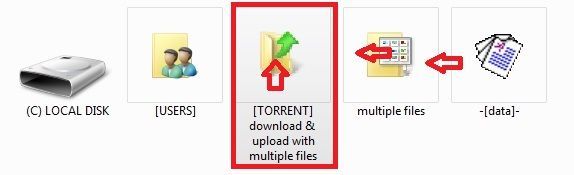
-
To add directory file folder select [TORRENT] w/c contains the folder w/ multiple files you are trying to post ...
[not the folder w/ multiple files] ... -
To add file or single file point to multiple files containing data or data ...
Always know where your upload/download folder location is ...
Review where you locate all your files: path/folder/name/directory location to get familiar w/ ...
SEE : https://community.gaytor.rent/topic/58266/uploading-for-dummies-please-help
-
-
@sylokbear-0 If you uploaded a folder, your torrent client will download a folder. This means that you need to set the download location one level BELLOW the uploaded torrent folder.
For instance, if the folder is "C:\Downloads\Torrent Folder" you need to set the download location to "C:\Downloads"
If you set your download to "C:\Downloads\Torrent Folder" then an additional folder will be created inside of it, and the files will not be found.
Remove the torrent from your software and add it again, set the location properly this time and it will start seeding right after checking the files.

Hello! It looks like you're interested in this conversation, but you don't have an account yet.
Getting fed up of having to scroll through the same posts each visit? When you register for an account, you'll always come back to exactly where you were before, and choose to be notified of new replies (either via email, or push notification). You'll also be able to save bookmarks and upvote posts to show your appreciation to other community members.
With your input, this post could be even better 💗
Register Login