Unable to download (access permissions)
-
Hi there, returning user and am getting a weird message from the tracker.
'An attempt was made to access a socket in a way forbidden by its access permissions'
My URL is in the form 'https://tracker.gaytor.rent/<random private string>/announce'
I have a mixture of old torrents from my last time being active on tracker URLs https://gaytor.rent and http://gaytorrent.tw:2710 that are all working fine, both uploading and downloading.
Is it something to do with the switchover from gaytor.rent to gaytor.rent?
Baffled as it is only newly downloaded torrents that are not working.
-
@gerggently ...
you need to re-download the torrent from https://www.gaytor.rent/
if this doesn't work, Write to helpdesk : https://www.gaytor.rent/helpdesk.phpAnother solution is to reset your passkey @ your profile settings ...
https://www.gaytor.rent/faq.php#17
Go to your page and request a new passkey. Note that by using this you will invalidate all the .torrent files
that you may have previously downloaded, and will have to download them again. -
The tracker URL is already in the form of https://tracker.gaytor.rent/uhfbuieswafbiweuafviweayfv/announce so I don't really know if that is the problem.
I'd prefer not to reset my passkey considering I have hundreds of old torrents working just fine.
-
@gerggently tracker should be http://tracker.gaytor.rent:2710/announce plus your passkey
[A passkey is a key associated with your account that uniquely identifies you as a gaytor.rent user.]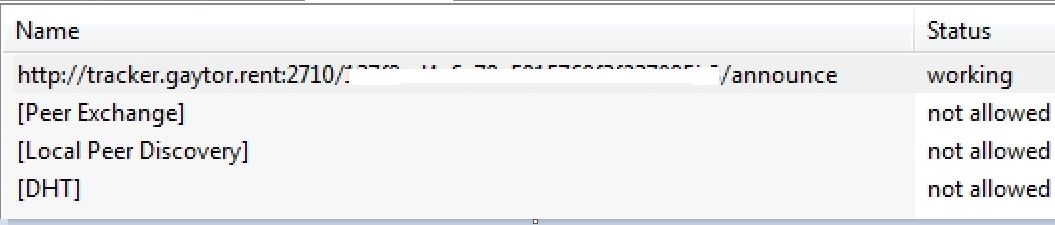
Im afaid, In that case write to helpdesk ...
https://www.gaytor.rent/helpdesk.php -
@john32123666 You have your profile set with the SSL tracker announce switch to off, mine is on, hence why my URL is different to yours and is in the https form.
-
In addition you should not post your passkey ID better flag that post ...
-
@john32123666 That is not my passkey, I just put rubbish in there.
-
@gerggently ok no problem write to helpdesk or any staff can look up into your case ...
-
@john32123666 You've still helped me possibly figure this out as if I edit my tracker URL to 'http:gaytor.rent:2710/dhewbfiuwebfgiuwbfg/announce' I have gotten some of the new ones to move and some old ones that I noticed were not moving either.
It doesn't explain why many of the downloads with the httpS URLs are working fine so hopefully Support can clear up what is going on.
-
@gerggently write click on the tracker, from add tracker copy & paste the working tracker and see if it works ...
-
I mean point on tracker, then right click on the tracker, from the add tracker, copy & paste the working tracker
from the non working tracker and see if it works ...
If those torrent indicates Failure/Unregistered Torrent then it has been remove from the list here ...
And if you are using utorrent 3.6+ version [has known issues] you should downgrade from 3.5 ... -
Usually errors related to socket permissions are the result of an anti-virus or peer blocking software. Some software like PeerBlock can cause this. The same is true if you use an IP filtering list in your torrent client or have an anti-virus that filters connections to different destinations, similar to PeerBlock or an IP filtering list in your torrent client.

The only difference between martyrdom and suicide is press coverage! -
OK, is there a particular port that SSL uses on GTRU tracker?
I've worked around it by assigning all my announce URLs to the non-SSL address, but I think I'd prefer to use the more private connection.
I can't think of any changes in my security config and if the port was being actively blocked it doesn't readily explain why the old SSL URLs were working fine.
-
@gerggently try using a different and more up to date client. qbittorrent or transmission, for instance.
If the issue with new torrents persist, I'd recommend you to copy a magnet to one of the old torrents you have from the same tracker (tracker.gaytor.rent) and add it to that different client just to see if it connects just fine. If the tracker is precisely the same and the behavior of old and new torrents are also the same in different clients then there might be an issue with your GT account.
If you end up having to update your passkey, you can manually add them to your client's old torrents, some clients even allow batch adding trackers so you can change all trackers at once.
-
@MrMazda By default, when no port is specified, HTTPS uses the standard port 443
-
@ianfontinell said in Unable to download (access permissions):
@gerggently try using a different and more up to date client. qbittorrent or transmission, for instance.
Using latest qBittorrent
If the issue with new torrents persist, I'd recommend you to copy a magnet to one of the old torrents you have from the same tracker (tracker.gaytor.rent) and add it to that different client just to see if it connects just fine.
I already noted that I changed the announce URL for all my GTRU torrents to the non-SSL http URL and they are now all working fine.
I would just prefer to use the SSL version for security reasons and when I was last on the tracker having SSL switched on and using the https announce URL I had no issues. All the old torrents continued to work with the https announce and it was only newly downloaded torrents that required me to use the non-SSL URL.
That's why it's so baffling to me, if the ports were blocked in some way it should surely affect all the torrents and not just newly downloaded ones.
If the tracker is precisely the same and the behavior of old and new torrents are also the same in different clients then there might be an issue with your GT account.
I'm sure the mod here would've told me if they saw an issue with the account.
I didn't bother trying another client and since issue seems largely resolved no there's no real need.
If you end up having to update your passkey, you can manually add them to your client's old torrents, some clients even allow batch adding trackers so you can change all trackers at once.
I shouldn't need to do something as drastic and when I collated all the torrents into one tracker URL there's over 2000(!) so changing them all wouldn't have been fun, but still doable I suppose



Hello! It looks like you're interested in this conversation, but you don't have an account yet.
Getting fed up of having to scroll through the same posts each visit? When you register for an account, you'll always come back to exactly where you were before, and choose to be notified of new replies (either via email, or push notification). You'll also be able to save bookmarks and upvote posts to show your appreciation to other community members.
With your input, this post could be even better 💗
Register Login