How to make a torrent file using qBittorrent?
-
Hello!
I've been wanting to upload a torrent file here but I can't seem to properly do it with qBittorrent and I think it has something to do with the trackers which is something that I have no knowledge of whatsoever. I also don't want to use uTorrent because of safety concerns. What should I do?
Thank you!
-
Run qBittorrent and select the Torrent creator option from the Tools menu. · Select the file or folder where the content that you wish to upload ...
Copy and paste: http://tracker.gaytor.rent:2710/announce
don't leave the tracker url box blankor you may get "missing dictionary key error" after upload!UPLOAD GUIDE: https://www.gaytor.rent/uploadguide.php
SEE: https://www.gaytor.rent/doupload.php -
Also, make sure to disable "Align to piece boundary" or you'll get a lot of junk padding files that take up space and can cause some problems (in my experience).
-
@cebm11 Thanks for pointing that out ...
concerning about padding files
SEE: https://community.gaytor.rent/topic/58307/padding-filesHow to disable BitComet from creating Padding files in torrents
This option can easily be disabled by unticking the "align file boundry" option when making a torrent.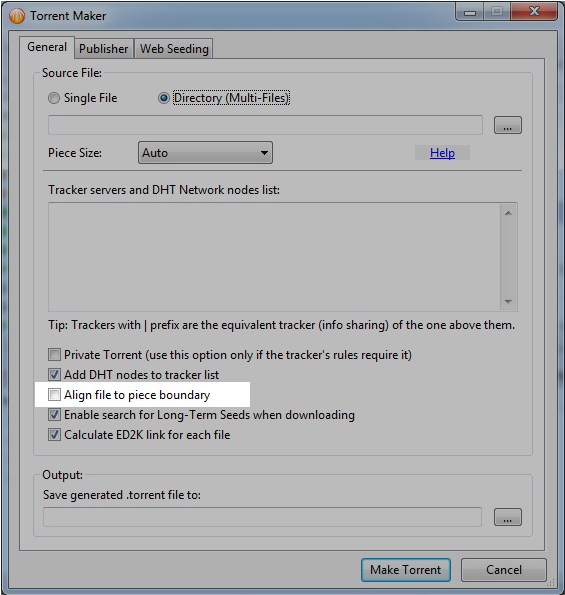
-
 J john32123666 referenced this topic on

Hello! It looks like you're interested in this conversation, but you don't have an account yet.
Getting fed up of having to scroll through the same posts each visit? When you register for an account, you'll always come back to exactly where you were before, and choose to be notified of new replies (either via email, or push notification). You'll also be able to save bookmarks and upvote posts to show your appreciation to other community members.
With your input, this post could be even better 💗
Register Login