Newbie wondering if created/uploaded torrents correctly to site
-
@john32123666 Hm. I followed the guide, but when I attempted to re-download the torrent, I pointed it to the data directory, but it's been "stalled" and says it's attempting to download, not upload.
I also get a tracker status "not working".
-
@devlon112 said in Newbie wondering if created/uploaded torrents correctly to site:
Yes this for tracker created by your client ...
http://tracker.gaytor.rent:2710/announce | http://gaytor.rent:2710/announcefollow the the guide and you're all set :
re-download the torrent here ... not the torrent created by your client [it won't work] ...If you are the first seeder of a torrent you uploaded yourself, you must seed the file at least until three complete copies (as seeders) are listed on the "Download" page of the tracker! Do not stop seeding a torrent before that time as this will result in a dead torrent!
Don't forget: There is no easier possibillity to push up your ratio than to let a torrent stay seeding in your client, as long as other clients want to have a piece of that cake.
How many torrents should I seed at the same time?
If you're the first seeder, please make sure that you can spread the torrent uploaded as fast as possible. To achieve that, do not upload more than 1 big torrent at the same time, stop seeding of other torrents and dedicate all your upload bandwidth to the torrents you want to spread.
https://community.gaytor.rent/topic/7663/first-time-uploader-program-ftup
any other question : https://www.gaytor.rent/helpdesk.php
Uploading Rules
If you are unable to seed a new upload, don't submit it until you can. If you are unable to continuously seed, please state so in the comment section of your upload to inform other users of the delay. You MUST CONTINUE SEEDING YOUR TORRENT until at least three or four other members have completely downloaded the file and can continue seeding for you. If you do not seed your upload within 3 days, it will be deleted and need to be resubmitted.
Upload only ONE NEW TORRENT AT A TIME in order to initially seed your upload as fast as possible. If multiple torrents are uploaded, they MUST be completed within 24 hours. -
To add directory file folder select [TORRENT] w/c contains the folder w/ multiple files you are trying to post ...
[not the folder w/ multiple files] ...To add file or single file point to multiple files containing data or data ...
Always know where your upload/download folder location is ...Review where you locate all your files: path/folder/name/directory location to get familiar w/ ...
SEE: https://community.gaytor.rent/topic/58266/uploading-for-dummies-please-help/3?_=1662178945411I also get a tracker status "not working".
https://community.gaytor.rent/topic/59660/upload-amount-not-updating/2?_=1662178945419
-
Okay. Thanks for the advice. I'm going to try again.
I've started fresh.
In qBittorrennt, I go to "Torrent Creator"
I select the path folder containing the 40 files (18 GB).
I select Private Torrent, and un-select "Start Seeding Immediately"
In the tracker URLs, I paste
http://gaytor.rent:2710/announce
http://tracker.gaytor.rent:2710/announceI click Create Torrent, and save the torrent file.
On the Upload page, I select categories, enter a title, select pictures, and enter a description.
I upload the torrent created above.
This is where I may be messing up.
From the torrent webpage, I click the download button, which opens a torrent in my client.
I change the "Save at" path to the folder which contains all 40 videos (18GB), have "Start Torrent" checked and "Manual" for Torrent Management Mode.
I click OK and that adds the torrent to my client.
Nothing happens after that, though. It's listed as "Stalled" downloading and the only tracker listed now is
http://tracker.gaytor.rent:2710/4feac733d00c59cd461eb7be3335e435/announce
And it says "Not Working".
What should I do now?
-
@devlon112 said in Newbie wondering if created/uploaded torrents correctly to site:
Nothing happens after that, though. It's listed as "Stalled" downloading and the only tracker listed now is
http://tracker.gaytor.rent:2710 [don't worry about this tracker this is fine] ...
And it says "Not Working".
What should I do now?You are downloading instead of seeding why is stalled [cause non seeder] ...
you did everything right from creating torrent and posting here ...
However you locate the file in wrong directory ...
[w/c is why you are downloading instead of seeding and stuck in finding peers] ...
To resolve this stop the torrent, right click and delete/remove the torrent not the torrent file ... And start all over again ...
[make sure to re-download the torrent here not the torrent created by your client [it won't work] ...Below is the image I provided for you to understand:
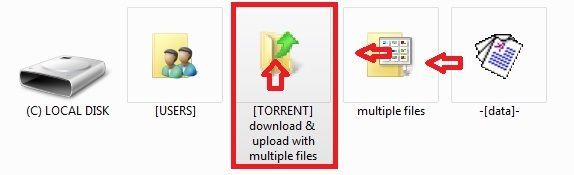
To add directory file folder select [TORRENT] w/c contains the folder w/ multiple files you are trying to post ...
[not the folder w/ multiple files] ...To add file or single file point to multiple files containing data or data ...
Always know where your upload/download folder location is ...
https://community.gaytor.rent/topic/58266/uploading-for-dummies-please-help/3?_=1662178945411What should I do now?
Locate or point to [add] the correct folder where your download folder not the folder directory [containg files] ...
https://www.gaytor.rent/uploadguide.php -
Thank you for the advice. I still don't think I'm understanding.
When I load the torrent downloaded from My Torrents, do I change the path to the folder which already contains the 18GB of files, or to a new empty folder?
This is what I enter when loading the torrent download from My Torrents:
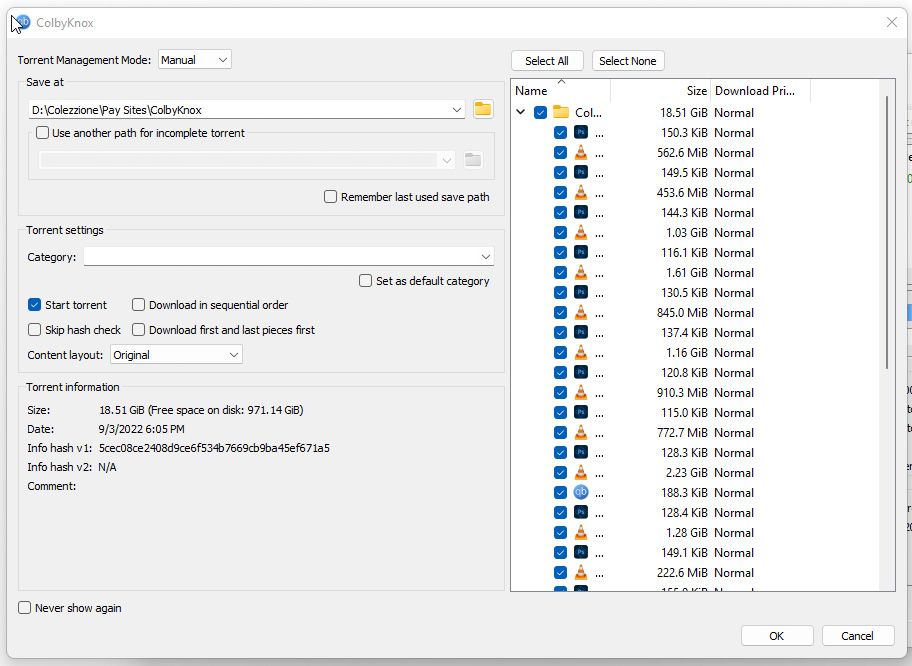
It is the directory where the files are located.
Or, do I need to enter a path to a new empty folder, "D:/[EMPTY FOLDER]
Maybe I need to try a different client. For some reason it's not uploading anything for me.
-
@devlon112 said in Newbie wondering if created/uploaded torrents correctly to site:
"D:/[EMPTY FOLDER]
Point to or [save/add] >>> D:\ not Empty folder nor the 18 GB [folder] ...
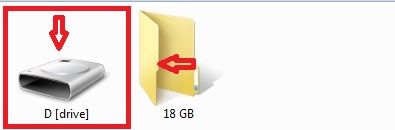
wait 100 % check before start seeding ...
please review all information from above post I provided ...
let me know ... -
- If the 18 GB folder is [ColbyKnox] point or select and add/save directory to [Pay Sites] folder ...
- If the 18 GB folder is [Pay Sites] point or select
add/save directory to [Colezzione] folder ... - If the 18 GB folder is [Colezzione] point or select add/savedirectory to [D:] drive ...

-
OH! That clarifies it. I have to point to the parent folder of the data file folder.
Yes, pointing to [Pay Sites] started the checking and it's now seeding properly, I think.
After it checked 100%, I received a message saying "This contains recursive torrent files. Do you wish to proceed downloading?"
I think if I clicked Yes, it would re-download the torrent files to the [Pay Sites] parent directory. I clicked No.
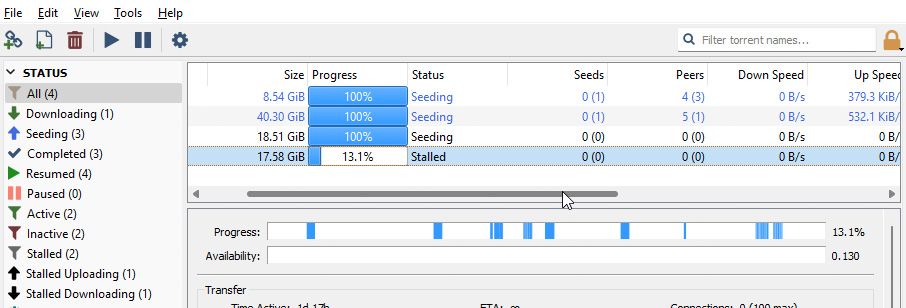
It's Progress 100%, Status Seeding now, with an upload arrow.
I have 0 seeds and 0 peers currently, but hopefully that will change as time progresses.
-
Quick Summary:
Not seeding if this is yours https://www.gaytor.rent/details.php?id=c310e70553194227889730199b0dd33d2ff6f5de77313ce2

POINTING THE .TORRENT FILE: The next step is CRITICAL and which gives users the most problems. As you load the .torrent file into the torrent program, you must direct the download to the associated data file. Click the option to search the computer file directory and locate the hard drive or external drive location of the data file. Click on the folder which contains the data file (or folder) and confirm it. If you don't point the .torrent file to the correct file location, the torrent program will search for the file in the default download folder.CHECKING THE .TORRENT FILE: The torrent program will parse the .torrent file, comparing it to the file data up to 100%. If this re-check process doesn't start automatically, you may need to force a re-check. Once it is verified you have the complete data file, your torrent program should automatically switch to seeding. If it doesn't, you may have to manually start seeding.
START SEEDING: Within 1-2 minutes, your torrent program will connect to the tracker and your upload will pop up at the top of the browse page. Sometimes you may get an Unregistered torrent error in the torrent program if the first attempt to connect to the tracker failed. You can manually force another connection try by right clicking on the torrent and Update Tracker. You can verify you are properly connected to the tracker by going to your profile page, scrolling to the bottom and clicking "open uploaded torrents." Check the numbers listed in the S/L column. If you see 1/0, you are finished. This means you are the seeder (1) and awaiting downloaders to leech the file from you (0).
https://www.gaytor.rent/uploadguide.php -
That's odd. I'll try that one again.
I've uploaded two more and they're actively uploading and seeding right now.
-
I got it fixed now. I had a torrent file inside the data directory on one.
All are up and seeding now. I think I've got the hang of it.
Thanks very, very much for all your help!
-
@devlon112 glad I stumbled onto this thread because I'm feeling well lost with all of this; completely different language! I downloaded the quick torrent maker and something is going on utorrent web but no idea if its correct. Hoping it'll all just fall into place at some point through sheer stubbornness
-
Hey -- yeah, I had trouble with the uTorrent client and the automated Quick Torrent Maker.
qBittorrent works much better for me, and the included Torrent Creator.
I haven't used uTorrent, so I can't offer any suggestions to that, but if you try qBittorrent and have any questions, I can try to help!
-
@devlon112 thanks mate, if I have no joy with my dumb luck I'll give yours a go and might tap you up for an assist
-
 J john32123666 referenced this topic on
-
J john32123666 referenced this topic on
-
J john32123666 referenced this topic on
-
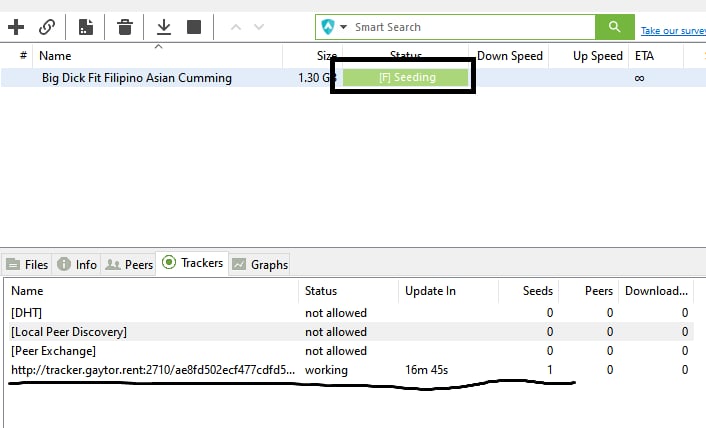
Hi i have the same problem, but it's on the seeding part but it does not upload anything and it's been an hour, i hope you can help for what steps you have taken to fix your problem
-
-
J john32123666 referenced this topic on

Hello! It looks like you're interested in this conversation, but you don't have an account yet.
Getting fed up of having to scroll through the same posts each visit? When you register for an account, you'll always come back to exactly where you were before, and choose to be notified of new replies (either via email, or push notification). You'll also be able to save bookmarks and upvote posts to show your appreciation to other community members.
With your input, this post could be even better 💗
Register Login