BitTorrent stuck on "Finding Peers" with 11 Seeders Feeding Torrent
-
Hello All, Searching for some help if someone would be so kind. When I attempt to dl any torrent from GT.ru my BitTorrent client does not connect and is stuck at "Finding peers 0.0%". I am able to dl from other torrent sites. Any help would be greatly appreciated - I have been a GT member since 2013 and maintain a respectable share ratio. Thank you.
-
I ran into this issue last night. It was fixed when i tried to force the download. Does that work for you?
-
@odecious72 Strangest thing. That just happened to me. But I was seeding the file. It was really weird. I had to switch my VPN to a new city. That seemed to have done the trick.
-
@odecious72 Thank you for the feedback on my post. I just tried the Force Download and sadly it still says "Finding Peers 0.0%" when I stop and just select start it says "Queued". Not sure why this issue is happening - it's only with GT.ru
Any other fixes you would share would be much appreciated.
Thanks for your time
-
@evilgenius69 Try to change the port, it might help
-
Thank you @kekkaishi - forgive me please - how do I go about changing the port? Thanks for your feedback
-
@evilgenius69 I use qBittorrent. Tools | Options | Connection
"Port used for incoming connections" - press "Random"This option should be available in all Bittorrent clients. You should look for it and try to see if it helps
-
Does anyone else have this issue? Cause I still do, my qbittorrent refuses to connect to seeders/peers
-
@makaradze Try to use VPN. Been having similar problem for too long.
-
@gogojunior I wouldn't go as far as using a VPN. even if it works it does not actually solves the core issue. I would try to google it further
-
@evilgenius69 sometimes i got this problem when the connection is bad...
-
@diriomaneva I have been having this problem as well. I made sure qbittorrent is fully updated and tried the "random port" suggestion above. I've done some help searching and just can't figure it out, which I hope it means it's something obvious right in front of my face.
-
"Tracker gave HTTP response code 404 (Not Found)"
How do I fix this?
-
@drkind said in BitTorrent stuck on "Finding Peers" with 11 Seeders Feeding Torrent:
"Tracker gave HTTP response code 404 (Not Found)"
How do I fix this?
Sometimes you just have to wait. The site does have to undergo maintenance from time to time.
I think it's good that you post when you're getting errors (if it's not "site maintenance" then the admins need to know there is a problem)... but it's also unreasonable to assume that a "dark web" service that is free to you is going to have 99.999% availability!

-
It’s been happening to me as well. I can’t download any torrent. My ratio is fine.
I tried restarting the program and force downloading/fore reannouncing. It does not work.
The tracker says “not working”.
Edit: it’s working now just as I finish typing and about to hit send lol. Idk sometimes you just have to wait. It’s kinda buggy. Force downloading works sometimes but not always. Restarting the program could fix as well I noticed, but sometimes you have to wait a bit like what happened to me just now.
-
GUIDE on > How to Fix uTorrent Stuck on Connecting to Peers:
https://helpdeskgeek.com/help-desk/how-to-fix-utorrent-stuck-on-connecting-to-peers/OTHER WAYS:
-
click on Options/Setup Guide [Run Tests]
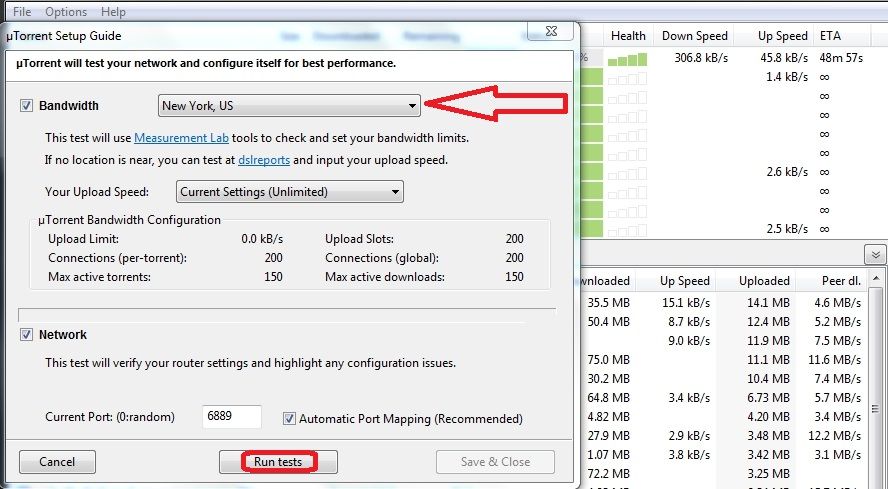
-
click on Options/Preferences [Connection]
change your port > 6881-6889 [default] port or use random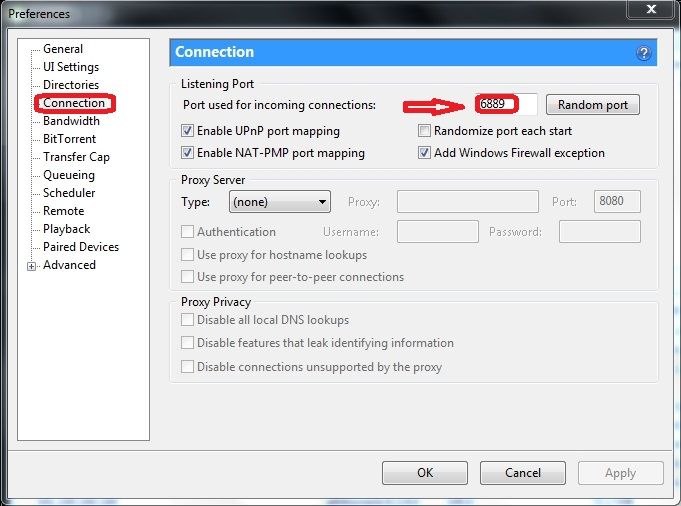
-
click on Options/Preferences [Bandwidth]
default > [200] Global / peers per torrent [50] / additional slots [4]
However you can modify these settings to allow all peers
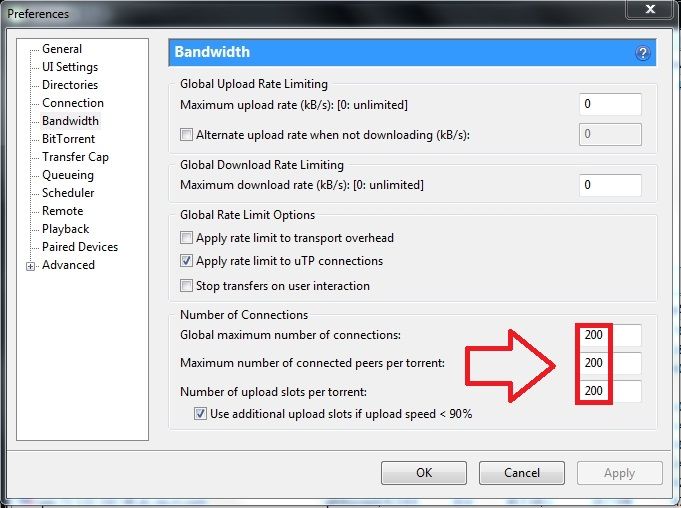
If it does not solve the issue Uninstall & re-install your client software or do a web search ...
Hope this helps ...
-
-
@john32123666 said in BitTorrent stuck on "Finding Peers" with 11 Seeders Feeding Torrent:
GUIDE on > How to Fix uTorrent Stuck on Connecting to Peers:
https://helpdeskgeek.com/help-desk/how-to-fix-utorrent-stuck-on-connecting-to-peers/OTHER WAYS:
-
click on Options/Setup Guide [Run Tests]
-
click on Options/Preferences [Connection]
change your port > 6881-6889 [default] port or use random -
click on Options/Preferences [Bandwidth]
default > [200] Global / peers per torrent [50] / additional slots [4]
However you can modify these settings to allow all peers
If it does not solve the issue Uninstall & re-install your client software or do a web search ...
Hope this helps ...
I often find changing my VPN server and/or port assignment helps....
-




Hello! It looks like you're interested in this conversation, but you don't have an account yet.
Getting fed up of having to scroll through the same posts each visit? When you register for an account, you'll always come back to exactly where you were before, and choose to be notified of new replies (either via email, or push notification). You'll also be able to save bookmarks and upvote posts to show your appreciation to other community members.
With your input, this post could be even better 💗
Register Login