Collection question
-
I see a collection 20GB of a type I like but I have most. Torrent page lists individual files. Is it possible to download the specific few I want without entire collection? Thank for any advice, Mike in Florida.
-
Depending on your bittorrent client, which you use… pls. specify the client to get a better answer for your question. - Generally this is absolutly possible.

-
If you download and open the torrent file, your torrent client should ask where you want to save the files. At that point you should be able to check those files on the list you want and uncheck those you don't
-
using U Torrent
-
You need to have selected in µTorrent > Options > Preferences > UI Settings > When Adding Torrents "Show options to change the name and location of the torrent data". That will pop-up the before mentioned window in which you can selected which files to download (and to where with which file name) when you add a torrent to µTorrent.
If you've missed that window (many user just click to quickly over it with "OK"), you can still set to download only some files under the "Files" tab in µTorrent's lower window part. Highlight the torrent and then chose to see the "Files" tab. There is a "Priority" column, right mouse button click on a file (Mac user Ctrl+click) and chose "Don't download" for the files you do not like to get.
–---
There is one inconvenience in downloading not all files. For a tracker you will count as a leecher, so if you have too many such seeding, you will get above our allowed downloading torrents at once. (You can simply stop that torrents for a while to download others).
-
@Uwe:
You need to have selected in µTorrent > Options > Preferences > UI Settings > When Adding Torrents "Show options to change the name and location of the torrent data".
In my version of uTorrent 3.0 the box to check reads "Show a window that displays the files inside a torrent in advanced mode"
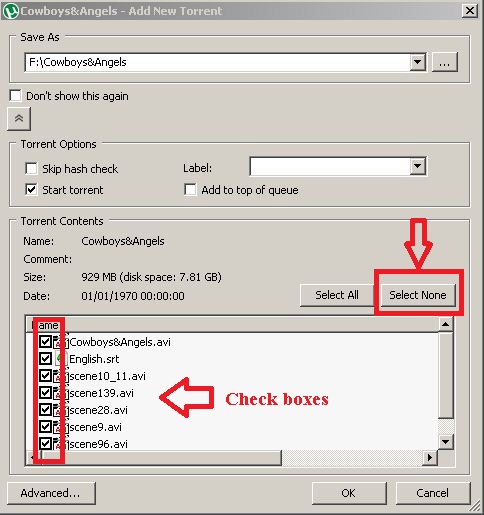
This will show a dialog as attached below. Choose 'Select none' and that clears the check boxes. Then you just click the boxes of those you want to download
Hello! It looks like you're interested in this conversation, but you don't have an account yet.
Getting fed up of having to scroll through the same posts each visit? When you register for an account, you'll always come back to exactly where you were before, and choose to be notified of new replies (either via email, or push notification). You'll also be able to save bookmarks and upvote posts to show your appreciation to other community members.
With your input, this post could be even better 💗
Register Login