• Categories
    • Recent
    • Tags
    • Popular
    • Users
    • Groups
    • Torrents
    • Login

    Testing

    Scheduled Pinned Locked Moved TEST section for our members
    142 Posts 4 Posters 84 Views 1 Watching
    Loading More Posts
    • Oldest to Newest
    • Newest to Oldest
    • Most Votes
    Reply
    • Reply as topic
    Log in to reply
    This topic has been deleted. Only users with topic management privileges can see it.
    • trkr4lifeT Offline
      trkr4life
      last edited by

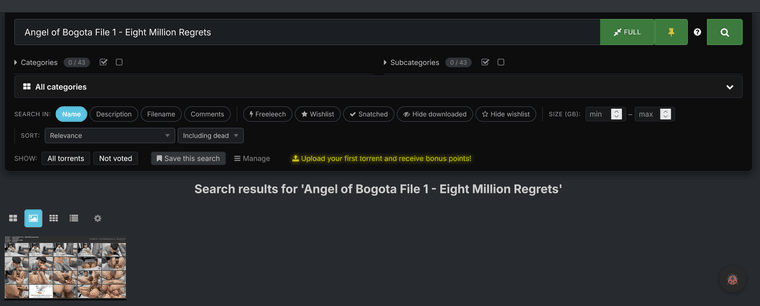
      ok here it is Screenshot 2026-06-23 at 08-47-19 Search results for Angel of Bogota File 1 - Eight Million Regrets.png

      Kevin4fmK 1 Reply Last reply Reply Quote 0
      • Kevin4fmK Online
        Kevin4fm @trkr4life
        last edited by Kevin4fm

        @trkr4life OK. No-one will see it in the normal (i.e. default) list views because it's not being seeded, and hasn't been snatched by anyone yet, though there are five people waiting for it. (1) So it's considered a "dead" torrent.
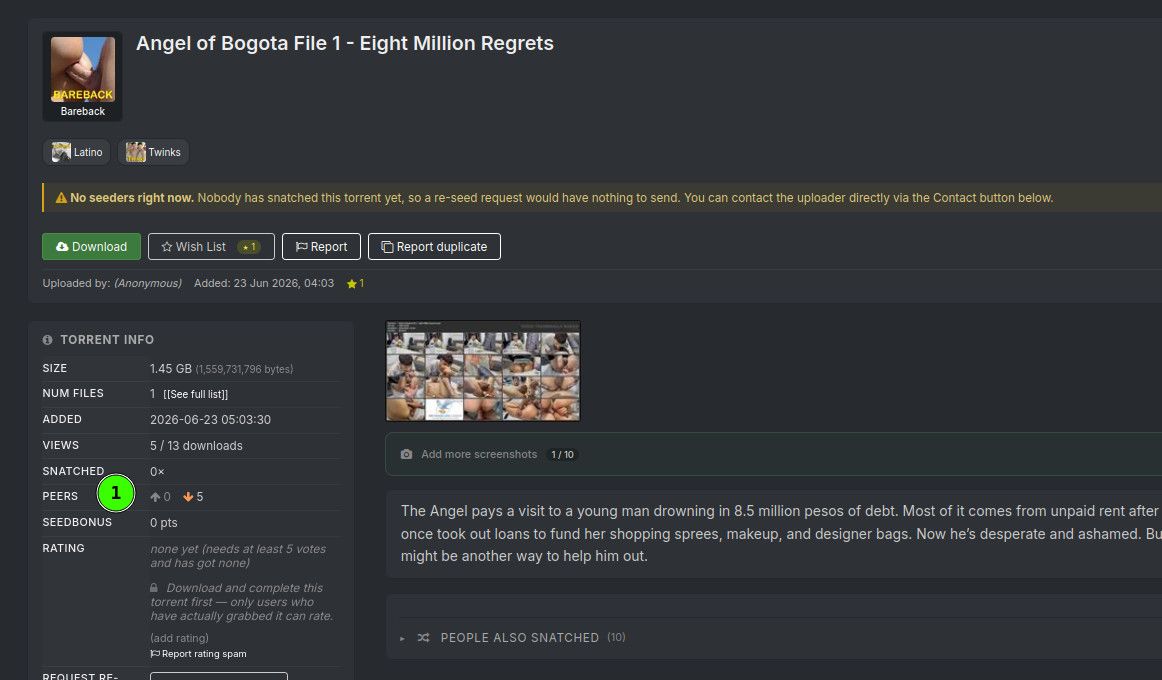
        c54be79a-af68-4d0e-bb60-5760c938ee9a-image.jpeg

        This is common when you either don't download and use the .torrent file created when you first uploaded the torrent, have it paused in your torrent client, or the torrent is maybe pointing to somewhere other than where the files for it actually are.

        • What client are you using - i.e. qBitorrent? uTorrent? Transmission? One of many others I don't know the name of?

        • If you didn't download the torrent that was created, do that. Treat it as if it was someone else's you just downloaded. Before you launch it, make sure you've got your client set up to be able to manually start and configure a torrent.
        e4be830a-09ad-490b-be90-86babe9865a6-image.jpeg

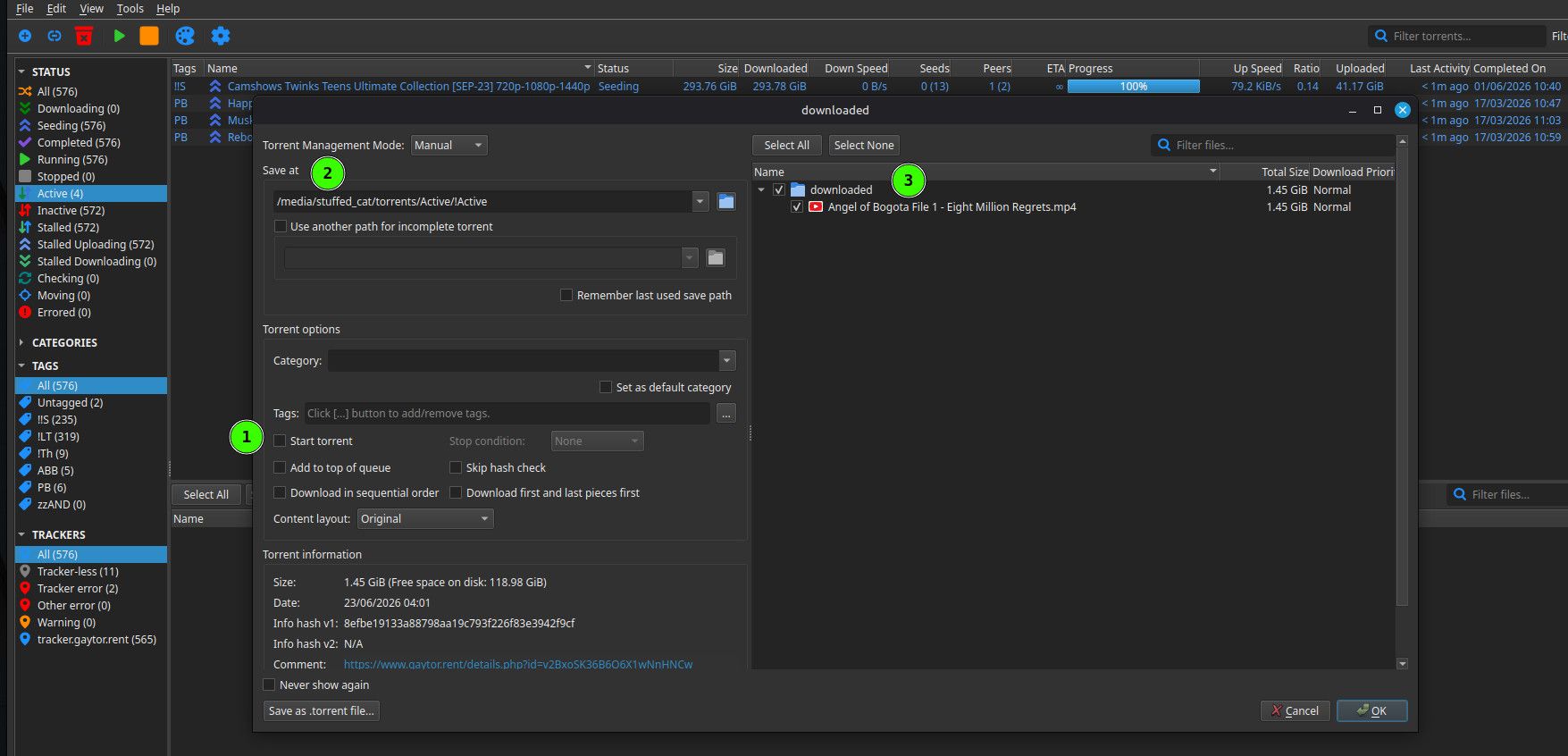
        I use qBittorrent. This is what it looks like when I launch the .torrent file. Other apps will likely look different, but the principle is the same. I always turn "Start" off, so it enters your torrent list as paused. It gives you the chance to make corrections if you've missed something before actually starting it.

        Make sure you're pointing to where the file is that you're trying to seed. The main path is (2). Mine may look unfamiliar because I'm on Linux, but Windows is essentially the same. So under that location, it's expecting to find a directory called "downloaded", within which there's a file called "Angel of Bogota File 1 - Eight Million Regrets.mp4".(3)

        Once that's all correct, click OK. That torrent will then show up in your torrent list as paused. In most clients - certainly qB and, I think, uTorrent - if you right click it, you're given an option to "Force Recheck". Select that. This simply compares what is there to what is supposed to be there according to the torrent. The progress bar will click up as it compares and should, hopefully, reach 100%. Once it does, "start" the torrent.

        It should then show on the Site's Description page that there is one seeder and start to seed.

        Sorry if you already know all this. Thought it better to go through step by step, in case not.

        If this doesn't work, is unclear, or I'm not getting the problem, feel free to say so. Remember, screenshots of what you're seeing can be extremely helpful and save long written explanations. If you're pasting tracker info though, remember to blank out the actual address after "...2710/". This identifies you personally on the site to keep track of your uploads/downloads. No-one else should need to know that, and someone could use it to pretend they're you!

        d7fc292f-3f4f-4687-a79b-9f2f1b14f2c9-image.jpeg

        Other opinions are also available. They're not right, obviously, but they are available.

        1 Reply Last reply Reply Quote 0
        • trkr4lifeT Offline
          trkr4life
          last edited by

          i did what you said but its not downloading

          Kevin4fmK 1 Reply Last reply Reply Quote 0
          • Kevin4fmK Online
            Kevin4fm @trkr4life
            last edited by Kevin4fm

            @trkr4life Ok. You're still not seeding it. What client (app) are you using to seed and leech torrents?

            Other opinions are also available. They're not right, obviously, but they are available.

            1 Reply Last reply Reply Quote 0
            • trkr4lifeT Offline
              trkr4life
              last edited by

              i'm using qbittorent i got it to download now what?

              Kevin4fmK 1 Reply Last reply Reply Quote 0
              • trkr4lifeT Offline
                trkr4life
                last edited by

                it says its seeding

                Kevin4fmK 1 Reply Last reply Reply Quote 0
                • Kevin4fmK Online
                  Kevin4fm @trkr4life
                  last edited by

                  @trkr4life OK. If you have your original torrent added to qB, delete the torrent. Make sure you don't have "Delete files" checked as well, though it should be seeing no files to delete anyway.

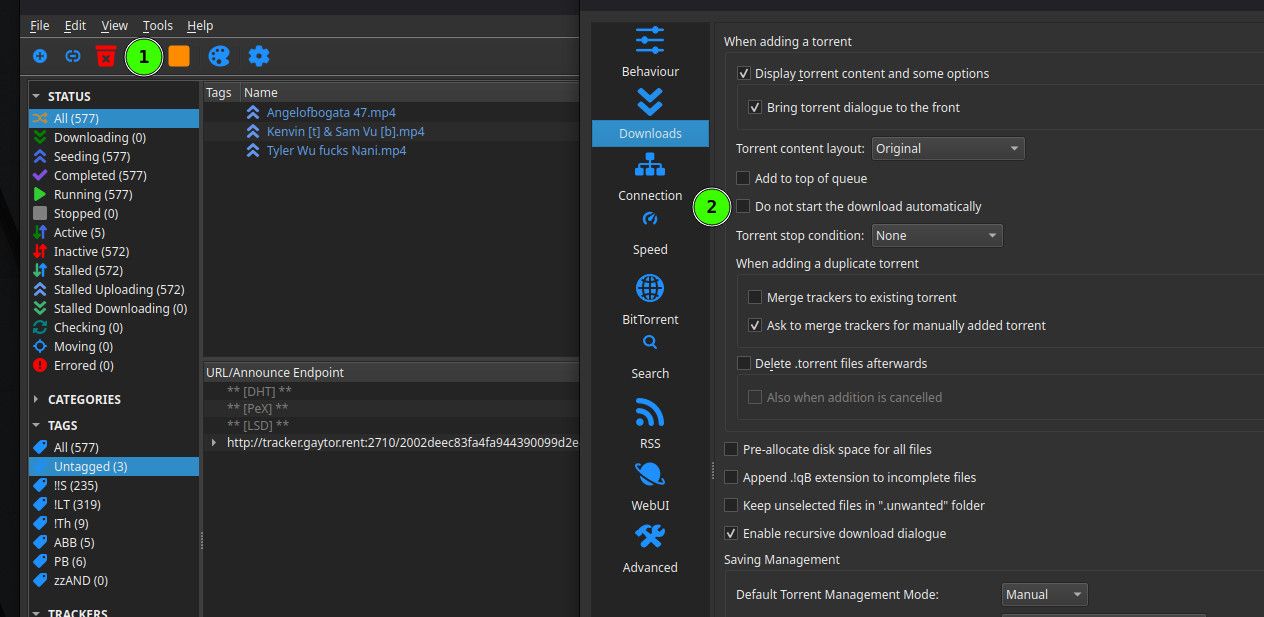
                  Make sure you've turned off automatic starting of files. I think for that you need to make sure "Do not start the download automatically" is unchecked. That's under Tools | Preferences.
                  f1d1dcb0-17a2-4dd0-be11-ea0765f0834b-image.jpeg

                  Then simply start the torrent you've downloaded in the same way as you do any other, probably just by double clicking the .torrent file. That should open the popup I pasted an image of earlier.

                  Do a screenshot of that, and post that here.

                  Other opinions are also available. They're not right, obviously, but they are available.

                  1 Reply Last reply Reply Quote 0
                  • Kevin4fmK Online
                    Kevin4fm @trkr4life
                    last edited by

                    @trkr4life Ah, OK. Did you force recheck it, or just have it start straight away? I've added it, and it's downloading a bit, but still shows no seeders.

                    Other opinions are also available. They're not right, obviously, but they are available.

                    1 Reply Last reply Reply Quote 0
                    • trkr4lifeT Offline
                      trkr4life
                      last edited by

                      so how do i get the seeders to show?

                      Kevin4fmK 1 Reply Last reply Reply Quote 0
                      • Kevin4fmK Online
                        Kevin4fm @trkr4life
                        last edited by Kevin4fm

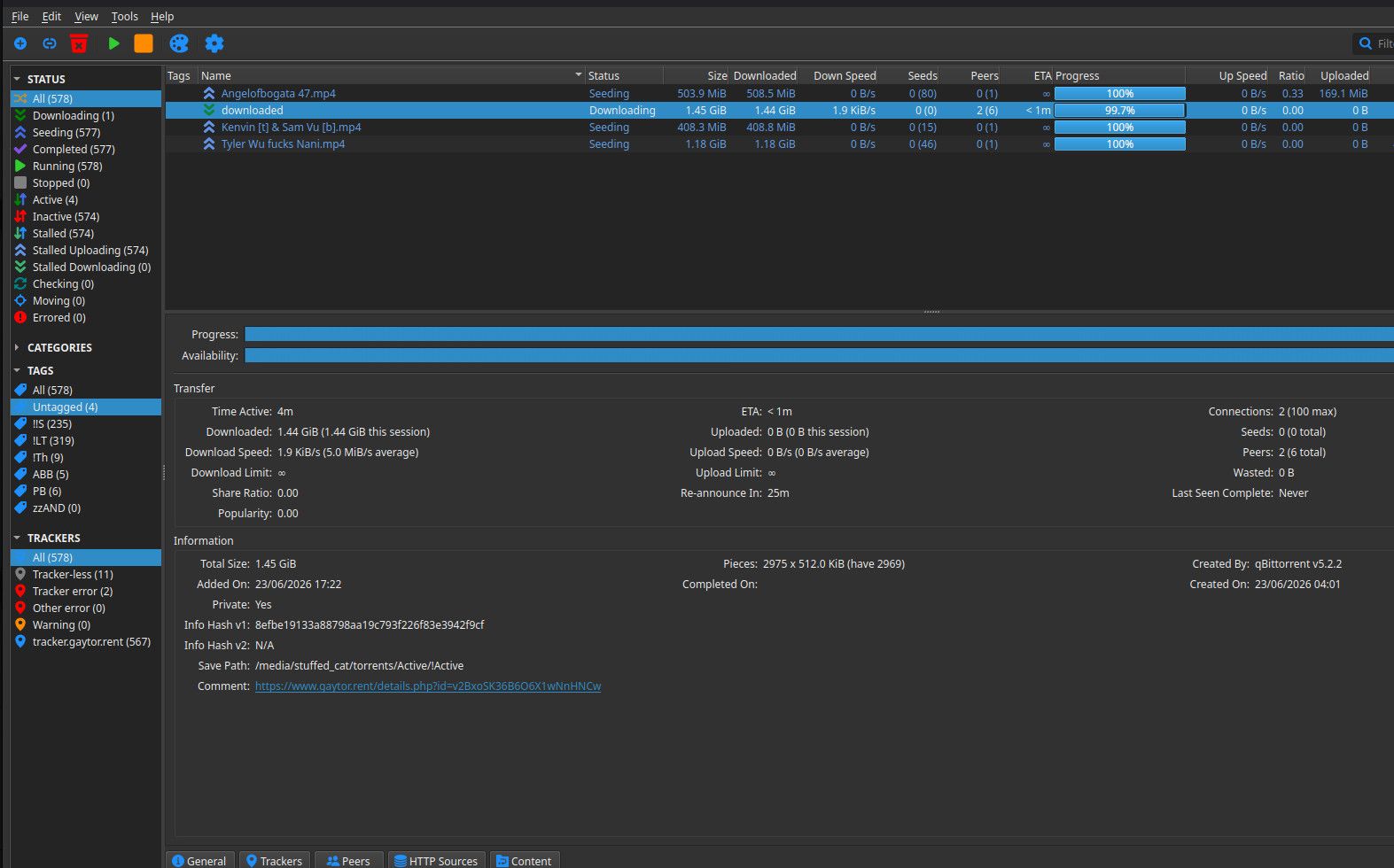
                        @trkr4life It's a little weird. You're definitely seeding, or I wouldn't be able to grab it, but it should now be showing one seeder. More than one soon, as I've only got one or two minutes to go.

                        It would really help to see a screenshot with the torrent selected and, maybe, the "General" tab.
                        69bd19c6-0740-4960-b122-c61987ef9260-image.jpeg

                        Other opinions are also available. They're not right, obviously, but they are available.

                        1 Reply Last reply Reply Quote 0
                        • trkr4lifeT Offline
                          trkr4life
                          last edited by

                          ok hold on

                          1 Reply Last reply Reply Quote 0
                          • trkr4lifeT Offline
                            trkr4life
                            last edited by

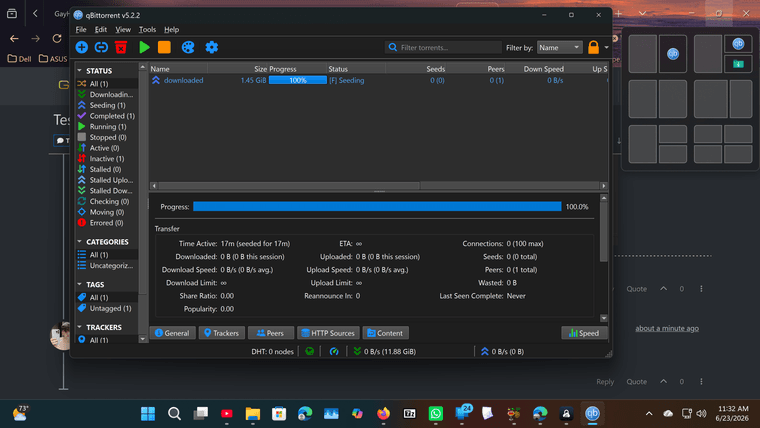
                            Screenshot (1).png

                            Kevin4fmK 1 Reply Last reply Reply Quote 0
                            • trkr4lifeT Offline
                              trkr4life
                              last edited by

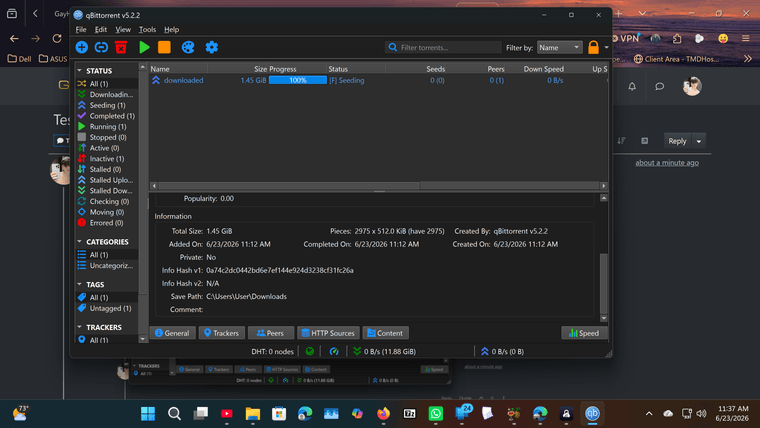
                              Screenshot (12).png

                              trkr4lifeT 1 Reply Last reply Reply Quote 0
                              • Kevin4fmK Online
                                Kevin4fm @trkr4life
                                last edited by

                                @trkr4life Ok. First, are you absolutely sure this is the new torrent? Not the one you created? It looks like it's the wrong one because the info here doesn't match up to what it should.

                                Secondly, is this file, perhaps, one you previously snatched from here as part of a multi-file torrent, that has since been deleted? There's a very small possibility that someone else snatched that too, and is seeding this, because it doesn't look like you are.

                                Feel free to send me a direct message, if you'd rather not answer in public! 😀

                                Other opinions are also available. They're not right, obviously, but they are available.

                                1 Reply Last reply Reply Quote 0
                                • trkr4lifeT Offline
                                  trkr4life @trkr4life
                                  last edited by

                                  no its my torrent i made it

                                  1 Reply Last reply Reply Quote 0
                                  • trkr4lifeT Offline
                                    trkr4life
                                    last edited by

                                    i have to go for about an hour or so but will be back i appreciate the help

                                    Kevin4fmK 1 Reply Last reply Reply Quote 0
                                    • Kevin4fmK Online
                                      Kevin4fm @trkr4life
                                      last edited by Kevin4fm

                                      @trkr4life I understand, but that doesn't answer the second question I asked.

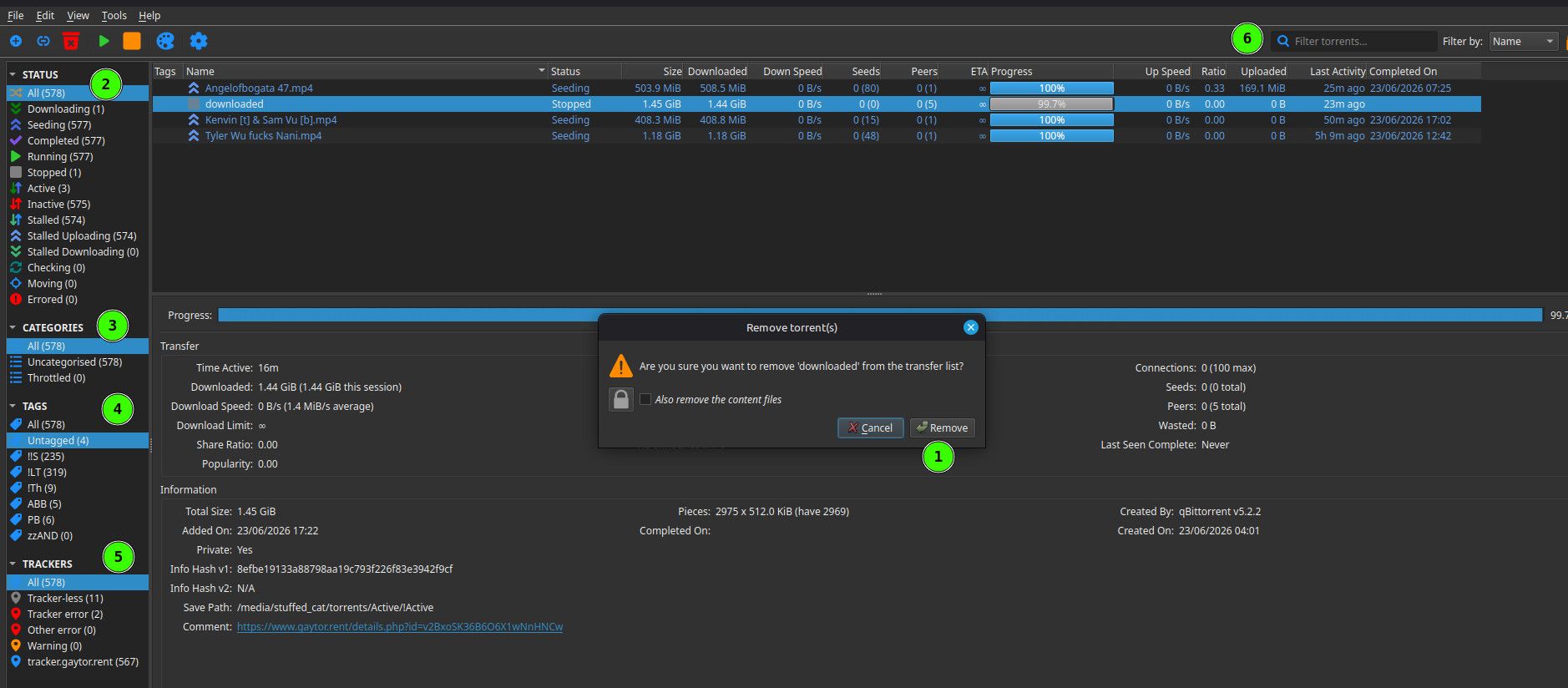
                                      You need to delete that torrent. JUST the torrent, not any files. Highlight the torrent "downloaded" in the list, right click it, then make sure "Also remove the files" is UNchecked. Then click "Remove" (1)
                                      ad98add1-e3ee-449f-8aa1-49f569076c9c-image.jpeg

                                      Then make sure all the filters on the left are set to "All" so the list shows ALL of your torrents. (2-5). Then type "downloaded" into the filter at (6). This will just check you don't have another torrent for the same thing. You could, because the one that you would download is not the same as the one you uploaded. If you have one, delete it - again the torrent ONLY.

                                      Then, download the torrent from the site. DON'T use one you downloaded earlier, or may have done, or is your original. Delete all of those .torrent files from your system, and download a new one. Then go through the steps I outlined earlier. Once it's set to manual, launch the torrent, and continue the steps.

                                      I should be around when you get back, though I may not be staring at this waiting for you to post something. Once you've got my attention though, we should be fine.

                                      Other opinions are also available. They're not right, obviously, but they are available.

                                      1 Reply Last reply Reply Quote 0
                                      • trkr4lifeT Offline
                                        trkr4life
                                        last edited by

                                        i did delete the file and tried it again as per your second question now i will try what you have here next

                                        1 Reply Last reply Reply Quote 1
                                        • trkr4lifeT Offline
                                          trkr4life
                                          last edited by

                                          reupload everything on this forum too then?

                                          Kevin4fmK 1 Reply Last reply Reply Quote 0
                                          • Kevin4fmK Online
                                            Kevin4fm @trkr4life
                                            last edited by

                                            @trkr4life So what do you have right now. No "downloaded" related torrents in qB, and the new torrent file ready to go? Not sure what you mean by "everything in this forum".


                                            Other opinions are also available. They're not right, obviously, but they are available.

                                            1 Reply Last reply Reply Quote 0

                                            Hello! It looks like you're interested in this conversation, but you don't have an account yet.

                                            Getting fed up of having to scroll through the same posts each visit? When you register for an account, you'll always come back to exactly where you were before, and choose to be notified of new replies (either via email, or push notification). You'll also be able to save bookmarks and upvote posts to show your appreciation to other community members.

                                            With your input, this post could be even better 💗

                                            Register Login
                                            • 1
                                            • 2
                                            • 3
                                            • 4
                                            • 5
                                            • 6
                                            • 7
                                            • 8
                                            • 7 / 8
                                            • First post
                                              Last post