Utorrent stopped downloading without explanations
-
@MrMazda its really strange, now i have 2 clients that work and 2 that dont work. But the 2 that dont work, are actually the same. Seems to be an X-File for Mulder and Scully

-
@schoenebergi Just out of curiosity, when you disable the SSL tracker on the one that's not working, or try changing the tracker URL to the non SSL tracker does it start working for you?
-
@MrMazda you mean removing the "S" at the tracker url when adding a torrent ? I tried that and get "http error 403"
-
@schoenebergi I took out the pic as it contains your passkey, but the non HTTPS tracker actually starts
http://tracker.gaytor.rent:2710/
OR

The only difference between martyrdom and suicide is press coverage! -
@MrMazda Sorry about the picture, I'm not a tech pro I dont even know what a pass key is
 I have added the tracker links you posted (removed the existing one, added one, tried it, removed it, tried the 2nd one), but still get HTTP error 404
 -
@schoenebergi Interesting... You usually only see that error when trying to scrape the torrent which is what happens when the torrent is inactive. This error is normal for trying to scrape, as we do not support the scrape. I wonder if something in your settings has changed somehow.
The only difference between martyrdom and suicide is press coverage! -
@schoenebergi when you download a torrent in this site, it comes with a custom tracker that is exclusive to you, this is how the site is able to know what you have downloaded/uploaded.
For instance:
https://tracker.gaytor.rent/outsav8be1auxiyy3olqe91h56rblhno/announceThe 32-character string you see in the middle is the passkey. In this case it is a fake one, only for demonstration. If someone for whatever reason have access to your passkey, they can add it to their torrents to make use of your ratio for downloading stuff. For this reason you should never reveal the complete tracker URL.
If you want to try the HTTP tracker, you should follow this structure:
http://tracker.gaytorrent.tw:2710/YOUR-PASSKEY/announce -
@MrMazda I know for sure I did not change any settings in Utorrent. I started it on sunday, everything was fine, downloads were working. And then after a while the error appeared. The downloads continued because the torrent was still connected to peers. New torrents didnt find any peers. Then i tried Bittorent (thats almost the same like Utorrent), that was installed at my computer, but I havnt used it for many months, I got the same error. I did not make any settings at Bittorent, just started a torrent and got the error.I turned off the Updates for both programs, so there was no update for both.
The only program that could cause this error is my Antivirus Program with integrated Firewall. This is updating every few days. But, if this Firewall is causing the error, why not at Vuze or Qtorrent ? Very strange. Thank you for your help anyway

-
@ianfontinell-0 Thank you for your explanation and help !! I did this check wrong last night that @MrMazda suggested.
Now I did it right and its downloading at utorrent, its connecting to peers, so its working with the HTTP tracker
-
@schoenebergi It looks like something did happen cause in different parts of the world you and I had the same issue at the same moment...
Thank you very much, I downloaded Vuze and now I'm back on the game. Still son't know what caused it, but I am glad its fixed!
Thanks!
-
@ianfontinell-0 I applied this change manually and it worked!
Now, I think I missed some part of the conversation cause I still do not understand why this is happening!And most importantly, can I do seomthing so I can have corrected in all torrents I download? Cause Vuze solved the problem but it made my computer veeeeeery slow!
-
@leo2003
To fix already downloaded torrents:Using qbittorrent you can update the tracker for all selected torrents. In the side panel there is a "Trackers" tab, use it to filter your torrents to only show the ones containing the tracker you want to update:
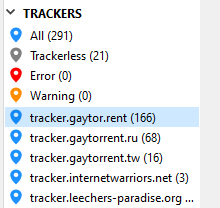
Next, select all the torrents in the list, and click "edit trackers":
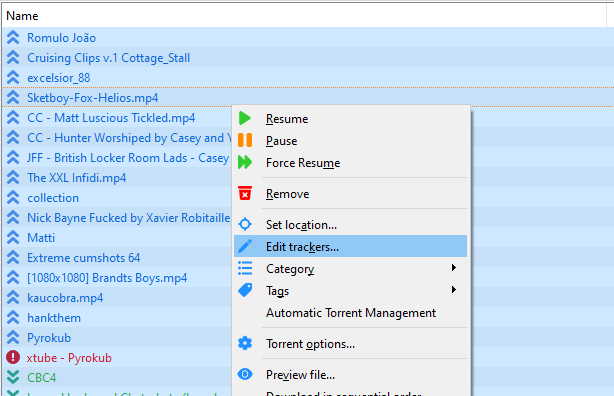
A window will pop up, you just need to paste the updated URL, make sure it's the only URL in the list, then simply tap OK.
To fix future downloads:
Make sure you are logged in on https://www.gaytor.rent
Go to https://www.gaytor.rent/my.php
Uncheck the SSL tracker box:

Following this, all your future downloads will come with HTTP tracker.
-
@ianfontinell-0 Thanks! It's fixed!
-
@MrMazda what problems could occur by having one's passkey leaked?
-
@lololulu19 Anyone who gets their hands on it can download torrents as you, without the need for your account password
-
@schoenebergi It may have been something that changed server side....

Hello! It looks like you're interested in this conversation, but you don't have an account yet.
Getting fed up of having to scroll through the same posts each visit? When you register for an account, you'll always come back to exactly where you were before, and choose to be notified of new replies (either via email, or push notification). You'll also be able to save bookmarks and upvote posts to show your appreciation to other community members.
With your input, this post could be even better 💗
Register Login