Odd error message from uTorrent
-
I'm using uTorrent 3.5.5 under Windows 10/64, and recently I've been getting a pop-under error message saying,
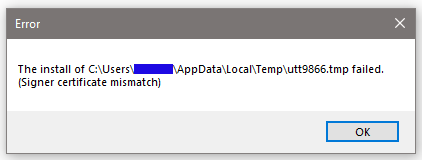
Sometimes I'll click "OK" to get rid of it, but then it comes back after a while.It doesn't get in the way, and it doesn't seem to affect how my uTorrent client works. I've looked up that .tmp filename, and it doesn't show up on any malware or virus sites. So, this is probably a non-issue, and I'm not going to bother the help desk on this. But this only started happening recently, and I'm wondering if this might be the tip of a nastier iceberg. Have any other Gentle Members noticed this "feature?"
BTW, I have auto-updates turned off in uTorrent. I spend a week in Version 3.6 hell, and I don't wish to go near that place ever again.
-
The first thing I thought of, was "there must be something wrong with his 'temp' folder, where uTorrent keeps unfinished downloads until they're finished". (in my case users/downloads/temp)
Then I realised that I have qBitTorrent, not uTorrent, ánd I have a Macbook so I'm probably not even close.
-
@AmsBoy91-0 said in Odd error message from uTorrent:
there must be something wrong with his 'temp' folder
This was a good catch...because even though uTorrent doesn't put anything in there, I still had >300MB of stuff in there--all less than a week old. I ran CCleaner and got rid of most of those files. Maybe this will solve the problem. Thank you!
-
@eobox91103 ...
@ top left toolbar : Options/Preferences/General - Clear Private Data
Transfer Cap - Reset History exit and re-start your client ...
Or re-download your client [version/build] here : https://utorrent.en.uptodown.com/windows/versions
uninstall only and re-install [this will install a fresh copy of cache and your original settings are save] ... -
@john32123666 Thanks for the tip. The window showed that it had been many months since I had done that, so things should be cleaner how.

Hello! It looks like you're interested in this conversation, but you don't have an account yet.
Getting fed up of having to scroll through the same posts each visit? When you register for an account, you'll always come back to exactly where you were before, and choose to be notified of new replies (either via email, or push notification). You'll also be able to save bookmarks and upvote posts to show your appreciation to other community members.
With your input, this post could be even better 💗
Register Login