New Design
-
I generally like the new layout but:
1. I'm seeing more and more pictures in picture view that are either too long or too short. (You cant click on the picture if it's too short since the hover popup covers the whole thing. And the long pictures just takes up too much space unnecessarily)
2. The search view on pc is spanned across the whole screen which makes it very hard to take in the information because you have to move your eyes a lot while there is too much white space in the middle. The old layout got this right but there is no option to turn off search 2.0.I look forward to the final version of this but for now please let me change back to old search view. Thank you!
-
I actually like the older one, altho this one looks clean and less laggy. BUT, I do think ratio should be highlighted or in evidence please

requested by many so far: the stats are "ALWAYS ON" again :cheers:
I do like, as the screen width gets smaller, that the stats "disappear" in sections and then all together. A small minor suggestion that might help, having the up and down numbers on top of each other (Stop it, just, no. Stop.) instead of side by side (as the others are stacked) would eeck out another few pixels before disappearing.
-
I do like, as the screen width gets smaller, that the stats "disappear" in sections and then all together. A small minor suggestion that might help, having the up and down numbers on top of each other (Stop it, just, no. Stop.) instead of side by side (as the others are stacked) would eeck out another few pixels before disappearing.
i have no final ideas yet, but i like to add also the messages to the view. so you see again ALL informations as long your browser size allows it.
I generally like the new layout but:
1. I'm seeing more and more pictures in picture view that are either too long or too short. (You cant click on the picture if it's too short since the hover popup covers the whole thing. And the long pictures just takes up too much space unnecessarily)
2. The search view on pc is spanned across the whole screen which makes it very hard to take in the information because you have to move your eyes a lot while there is too much white space in the middle. The old layout got this right but there is no option to turn off search 2.0.I look forward to the final version of this but for now please let me change back to old search view. Thank you!
1. i have to work on that module…. actually i am on search2.0 how you call it.
2. it is ment to be fullscreen. you just could decrese the size of the browser window. i have plans to add some of the pictures here too. so you see even more of each torrent without to have to click. maybe there will come a switch to toggle between a "smaller" view and the lets say "extended view" -
I like it, especially the main index pane (strip) that stays frozen at the top of the page, even when one scrolls down.
…
Members can be reminded that pages can grow (or shrink) with browser controls (e.g., "Cntrl" & mouse wheel).This is definitely worth noting. If zoomed in too far, some elements from the top bar disappear (traffic statistics, active torrents, ratio, bonus…).
For the shy:
Holding down the Ctrl key on the keyboard and moving the mouse wheel up or down will enlarge or shrink the web page contents (which direction performs which action depends on your system settings). In most browsers, Ctrl-zero on the keyboard will restore the contents to their default size (also called 100% zoom).You can also zoom in or out using just the keyboard:
Zoom IN: Ctrl and + (⌘ and + on a Mac)
Zoom OUT: Ctrl and - (⌘ and - on a Mac) -
I very much appreciate all the work that has gone onto this, and i do find a lot of the design much cleaner and friendly, but….
I regret to say that I find the SEARCH page is filled with too much information for each torrent. It feels like I am being assaulted with more information that I want, and this makes it difficult to identify and focus on the information and torrents that I do want. And because each torrent is given more real estate on the page, there are fewer torrents on the screen as you scroll through; I find this very disorienting as it is hard to tell where I am on the page - it is disorienting I much prefer this page as it was: giving me a very brief teaser with mouse-rollover to access to pictures, helping me decide quickly if I wanted to explore the torrent further. With the new layout, I found myself developing a headache trying to weed through what is worth reading and what is not worth reading, and finally giving up. Sometimes less information is actually more, because it helps one focus and choose. Too much information defeats that purpose.
But, again, thanks for all the care and good work.
-
I do like, as the screen width gets smaller, that the stats "disappear" in sections and then all together. A small minor suggestion that might help, having the up and down numbers on top of each other (Stop it, just, no. Stop.) instead of side by side (as the others are stacked) would eeck out another few pixels before disappearing.
i have no final ideas yet, but i like to add also the messages to the view. so you see again ALL informations as long your browser size allows it.
I generally like the new layout but:
1. I'm seeing more and more pictures in picture view that are either too long or too short. (You cant click on the picture if it's too short since the hover popup covers the whole thing. And the long pictures just takes up too much space unnecessarily)
2. The search view on pc is spanned across the whole screen which makes it very hard to take in the information because you have to move your eyes a lot while there is too much white space in the middle. The old layout got this right but there is no option to turn off search 2.0.I look forward to the final version of this but for now please let me change back to old search view. Thank you!
1. i have to work on that module…. actually i am on search2.0 how you call it.
2. it is ment to be fullscreen. you just could decrese the size of the browser window. i have plans to add some of the pictures here too. so you see even more of each torrent without to have to click. maybe there will come a switch to toggle between a "smaller" view and the lets say "extended view"The old search view is back on my end. Idk if this is your doing but if it is, Thank you :love: :love: :love:
-
Honestly i'm not going to complain much i have only 2 requests (with 1 bonus)
1. I only use this site on my computer and when i click on the photos while i'm looking to download a torrent, usually the images all come up on the SAME page and i can click from right to left then X it and still have the original page right in front of me. It was neat and easy. Now as soon as i click on a picture, i'm out of the torrent page and i just have the JPEG. So then i have to load the previous page again, and the same thing with every other picture… Can you fix that please, sir ?
2. The BROWSE button is kind of... the most important one ? I wish it had been chosen as one of the main tabs at the top of the page.
Bonus : I wish the option to keep the old version was never taken away from us.....EVER ! And i say that for every site that has updates :afr2: But is the reasoning that it will start fucking up after a while ?
-
pls go back to how it was. the current one is messy
-
pls go back to how it was. the current one is messy
super not helpful ! how about use another site then?
Honestly i'm not going to complain much i have only 2 requests (with 1 bonus)
1. I only use this site on my computer and when i click on the photos while i'm looking to download a torrent, usually the images all come up on the SAME page and i can click from right to left then X it and still have the original page right in front of me. It was neat and easy. Now as soon as i click on a picture, i'm out of the torrent page and i just have the JPEG. So then i have to load the previous page again, and the same thing with every other picture… Can you fix that please, sir ?
2. The BROWSE button is kind of... the most important one ? I wish it had been chosen as one of the main tabs at the top of the page.
Bonus : I wish the option to keep the old version was never taken away from us.....EVER ! And i say that for every site that has updates :afr2: But is the reasoning that it will start fucking up after a while ?
1. can you clear your browser cache? this still should work as expected.
2. Other people think the "search" button is the most important one. DAMN is it so hard to click one more time?
3. if anything changes in your life… do you complain or try to get used to it?! -
pls go back to how it was. the current one is messy
uhmm there is a button for that, as stated, multiple times.
-
I would appreciate your feedback on today's design update. Some of you have already reported about fonts that are too small. It is always very important to know where exactly on which page you see a problem. Then we save ourselves unnecessary questions back and forth. Of course I am also happy about every positive feedback, without any change wishes. :cheers:
I love the new streamlined design. For me it's easier to navigate. I'm on an older mac device and it actually seems to work better than the previous incarnation.
-
The cleaner layout is nice, but it would be helpful, I think, if you provided the ability to control some aspects of the search page.
- choices of how much description to display, and an option to provide it via hover popup or a click-to-expand button on the item listing instead
- choices of displaying the category thumbnail image or perhaps a primary uploaded image related to the torrent.
- perhaps choosing from a selection of column styles where there are full scrollable description columns as well as shortened minimal description columns; expand this to even having individual columns for things currently combined into one, like the "Info" column, which could also allow for a category image column and a torrent image column.
For my use, the current new version is exceedingly too spread out and too noisy. I intend to keep using whatever the default is as you develop this, though, just in case it's just something I need to get used to.

Also, just to mention, I have never really used the "Browse" option, but I think it would be more useful to me if it offered a way to easily indivicate what I've already downloaded, perhaps like "Freeleech" is overlaid as a banner, or dimming the image until it is hovered over.
-
The cleaner layout is nice, but it would be helpful, I think, if you provided the ability to control some aspects of the search page.
- choices of how much description to display, and an option to provide it via hover popup or a click-to-expand button on the item listing instead
- choices of displaying the category thumbnail image or perhaps a primary uploaded image related to the torrent.
- perhaps choosing from a selection of column styles where there are full scrollable description columns as well as shortened minimal description columns; expand this to even having individual columns for things currently combined into one, like the "Info" column, which could also allow for a category image column and a torrent image column.
For my use, the current new version is exceedingly too spread out and too noisy. I intend to keep using whatever the default is as you develop this, though, just in case it's just something I need to get used to.
Also, just to mention, I have never really used the "Browse" option, but I think it would be more useful to me if it offered a way to easily indivicate what I've already downloaded, perhaps like "Freeleech" is overlaid as a banner, or dimming the image until it is hovered over.
there will come configuration options of this view… at the moment, you see also pics in that view.. i would call this EXTENDED view...
-
New design is much, much, much better that previous one.
:cheesy2:
Thanks| -
The link to Search has now been moved out of the Torrent drop-down menu and put back on the menu bar. That inconsistency is confusing. If you are going to use drop-down menus, commit to them. It took me a few seconds to realize that Search was really missing from the drop-down menu and then to spot it in the new location.
-
I have two problems with the new design and both are about usability.
1. Showing pictures on search by default makes it more difficult to navigate, and not easier. There's too much information on screen, I'm bombarded with thumbnails of torrents I'm not necessarily interested in until I get to find the ones I want to see. 2. Then the new way to zoom in the images to check more than the thumbnails is not intuitive. In the end I get to see less of what I want and way more of what I don't care about.
Not everyone uses browse as primary way to find their files.
I like the new fonts, but about the new color scheme at first I thought somebody had died and the site was mourning… -
I have two problems with the new design and both are about usability.
1. Showing pictures on search by default makes it more difficult to navigate, and not easier. There's too much information on screen, I'm bombarded with thumbnails of torrents I'm not necessarily interested in until I get to find the ones I want to see. 2. Then the new way to zoom in the images to check more than the thumbnails is not intuitive. In the end I get to see less of what I want and way more of what I don't care about.
Not everyone uses browse as primary way to find their files.
I like the new fonts, but about the new color scheme at first I thought somebody had died and the site was mourning…I for one like having pictures in search. Looks a bit cluttered atm but there is potential for it to look better (limiting number of visible photos, uniform sizing, better placement…). Still wish the search is less wide though.
Also when you scroll if there is an entry with super long description you have to scroll though the whole thing before it continue to scroll down the page. Please limit the description length to fit the container height and put ... at the end. -
The search page is very loaded.
Try to make it simple:
The images in the category - The name of the file - <text icon="">(Positioning the mouse over or clicking on, opens a window with the description) - (Positioning the mouse over or clicking on, opens a window with the images side by side).</text>
-
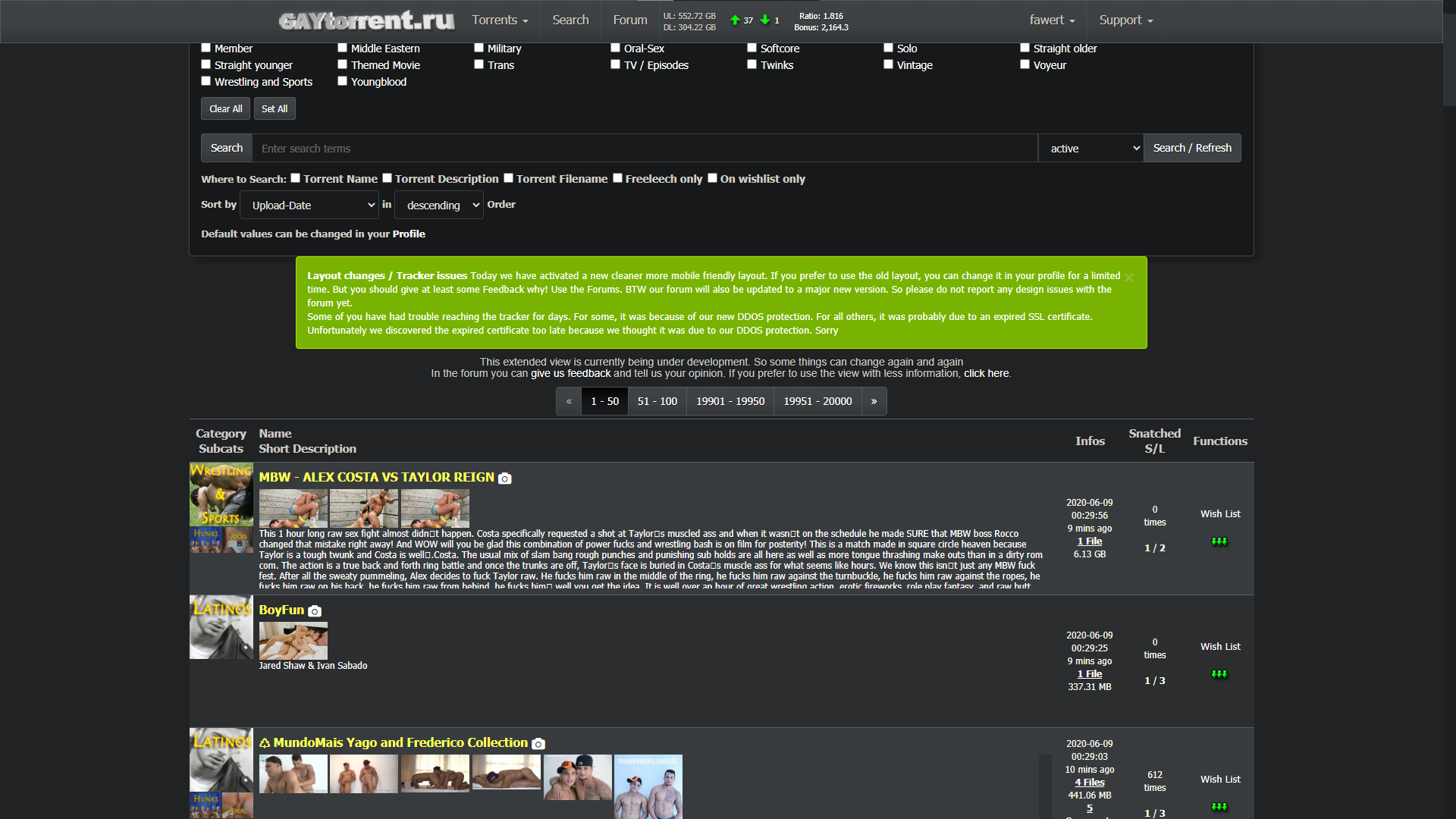
In case there is someone like me who like the (just a bit cluttered) new search but want it to be thinner like the the old one:
1. Download Stylus extension for whatever browser you're using.
2. Write a new style
3. Follow the 1st image
4. Result (2nd image)Or if you dont care about having pictures in search just disable the new style in profile setting.
This is just a temporary solution you wont need this once the size picker feature is added in the future.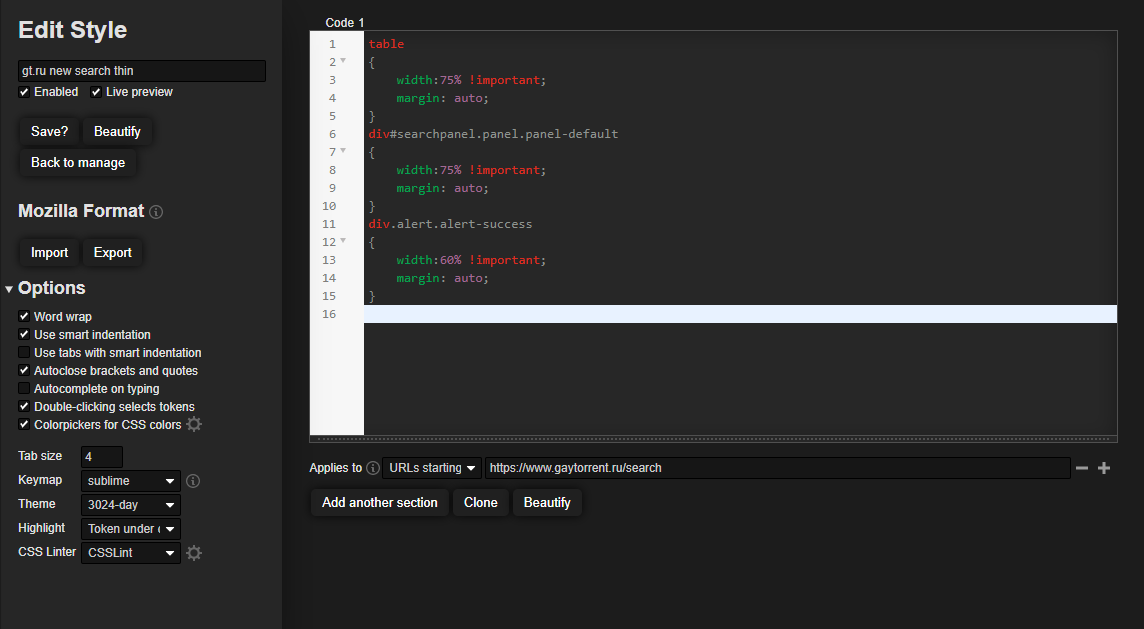
-
I just tried the new Search page again.
All I can say is… wow! Just wow.
You fixed all the problems and now I like it much better than the older version.
Thanks a million! Just adding the exact file size to the description, and getting rid of the page title change for new messages, makes this site much more usable. But you've done so much more than that. Very impressive! Thanks again!!!
:cheers:


Hello! It looks like you're interested in this conversation, but you don't have an account yet.
Getting fed up of having to scroll through the same posts each visit? When you register for an account, you'll always come back to exactly where you were before, and choose to be notified of new replies (either via email, or push notification). You'll also be able to save bookmarks and upvote posts to show your appreciation to other community members.
With your input, this post could be even better 💗
Register Login