[petition] Making it mandatory to give details about codec & resolution
-
I voted Yes ;D Yeah, I'm an idealist, I know.
cumeaternc is perfectly right - most of people in here have no clue about resolution, codecs, frames and stuff like that. And I'll go even further saying a great part of users upload just for the sake of uploading and improve their ratio, with no actual interest in what exactly they're uploading.
So, as good as this idea is, alas, it won't do any good

-
I'm voting no to this one; it's just one more rule to discourage potential uploaders.
I would have voted yes to strongly encouraging uploaders to offer this info, if there's a good enough tutorial at hand on how to retrieve and offer the data that even a fresh newbie will get it right.
The rating system isn't a good alternative, at least in its present form, and I doubt this software is geared to support separate ratings for original flick and the quality of the rip (which to be thorough might even require ratings for audio and video separately; you see where this is going…)
Comments also aren't the way to go, because before there's enough of them to give a reliable impression there'll be too many to read through when all you want is the porn.
And having a smaller group of trusted members 'recommend' one rip over another means those members must necessarity download possibly copyrighted material as part of their duties; and that's just plain asking for trouble.
I've no good ideas on how to reliably solve this issue. But kinda suspect that if ratio wasn't so hard to come by for some members it wouldn't be issue at all.
-
Hi Mgr,
I already voted "no opinion", for the same reasons exposed by Brandon and you.Concerning the codecs, I use the freeware MediaInfo (SourceForge) and it's a great program, as you can see it here.
hXXp://mediainfo.sourceforge.net/enEven if we (maybe) will never be allowed to download its source from GT, everybody can download it from the precedent link. Then it's easy to take a snapshot (it adds one line in the context menu of Windows Explorer) or to export some infos in a text file, copy-paste in the torrent description page etc…
I'm pretty sure you already know this program (which is frequently updated) and yes, it will detect codecs that the old GSpot won't detect . I remember having PM you an example of compared detection on a mkv file, not detected by GSpot but detected by MediaInfo, as show in the 2 following links :
Not detected by GSpot :
http://tracker.gaytor.rent/bitbucket/1-Gspot.jpgDetected by MediaInfo :
http://tracker.gaytor.rent/bitbucket/2-MediaInfo.jpgAs GSpot had its development stopped 4 years ago (fev 2007), how do you want it to report correct informations when new codecs appear periodically or are updated ?
In case you never tried MediaInfo, please have a look at it.
I'm convinced you'll like it a lot...no matter what you'll do with it after
staff edit: live link disabled
-
Unless I'm not mistaking, the technical details that we are talking about can be provided by the video-player itself. At Least KMPlayer does that.
-
the technical details that we are talking about can be provided by the video-player itself.
At Least KMPlayer does that.VLC Player as well!
And, unlike KMPlayer (and GSpot), it is NOT just for Windows
Linux and Mac is supported too -
VLC Player as well!
And, unlike KMPlayer (and GSpot), it is NOT just for Windows
Linux and Mac is supported tooLike twinkletoes, VLC is the player I use most of all
The question is : what is the quickest way to include technical infos in the torrent page ?
I wouldn't like to write them manually, maybe some mistake will be done while writing, or it will take time, also it's boring to write them manually.Does VLC allow an easy copy of the infos, so you can quickly paste them in the torrent page ?
I tried but couldn't make it (though I didn't search a lot throughout VLC interface)MediaInfo allows what follows :
- Right click on the movie name in Windows Explorer, then…
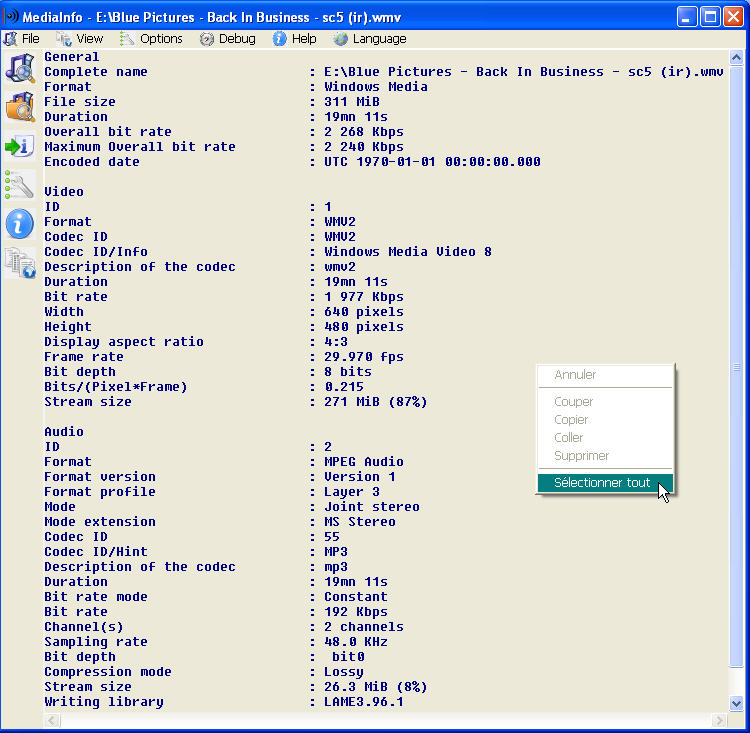
- the 2 attached pics reflect some of the different output that immediately appear, then you can copy-paste wherever you like : could it be simpler ?
I have a question related to this :
In some torrents pages (I can't find any now ) there is a "NFO" part in the left blue column (you know, the column where it's written "Size" , "Rating" , "Added" , "Views" etc…)How is this "NFO" part filled ? Is it the user that fills it with technical infos or is it automatically filled depending on... ?
And why is it present in some torrents only ?
tia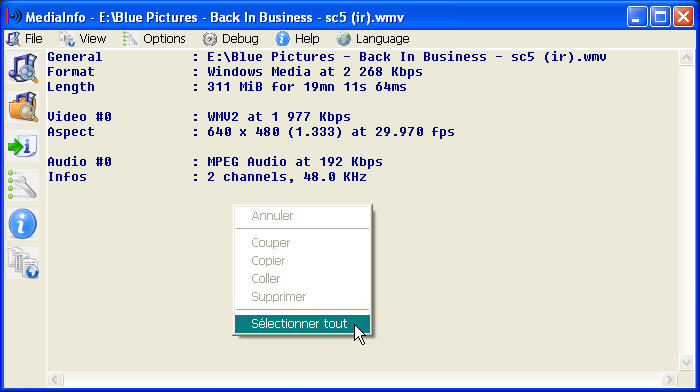
-
I voted yes; however I think a better choice would be "strongly recommended". I include some technical details in my uploads. I obtain these from Media Player Classic. Just click on File, then Properties, then the Details tab in the Properties window. It is an easy copy & paste (which is more difficult in VLC). Here is a sample:
Audio: Windows Media Audio 48000Hz stereo 96Kbps [Raw Audio 0]
Video: Windows Media Video 9 720x480 (4:3) 29.97fps 2000Kbps [Raw Video 1]I am not an overly technical person, so I don't know if this provides all of the information desired. Also, I usually include the running time as well, as I hate downloading what appears to be a full movie and then finding out that it is not.
Another idea might be to create a High-Quality category (similar to DVD-R) with minimum standards. I have seen torrents listed (HQ) in the description but are not what I would consider to be high quality.
-
I voted yes; however I think a better choice would be "strongly recommended". …
In that case, you should have voted "No", because strongly recommended means not mandatory … actually I gave only two choices so that members must make up their mind if the want to make it really mandatory or leave uploads without such information possible.
Another idea might be to create a High-Quality category (similar to DVD-R) with minimum standards. I have seen torrents listed (HQ) in the description but are not what I would consider to be high quality.
"HQ" is an attribute originally given to the VHS standard improvements (not really High Quality), then used for DivX/Xivd using decent quality encoding settings i/o of pressing the size to one 700 MB CD-R by all means. Still such a "HQ" AVI got a lower quality than the original DVD.
IMHO what you are looking at, is a HD (High Definition) section, something which should be discussed in it's own topic. I would set the minimum requirement to a resolution of 720x1280 pixel, but that is not all, the codec/bit rate combination must be good, too;
.
We got already the ~HD tag, so uploader can tag their clips (there are many in HD) or movies being in HD by it. -
…could it be simpler ?
Yes
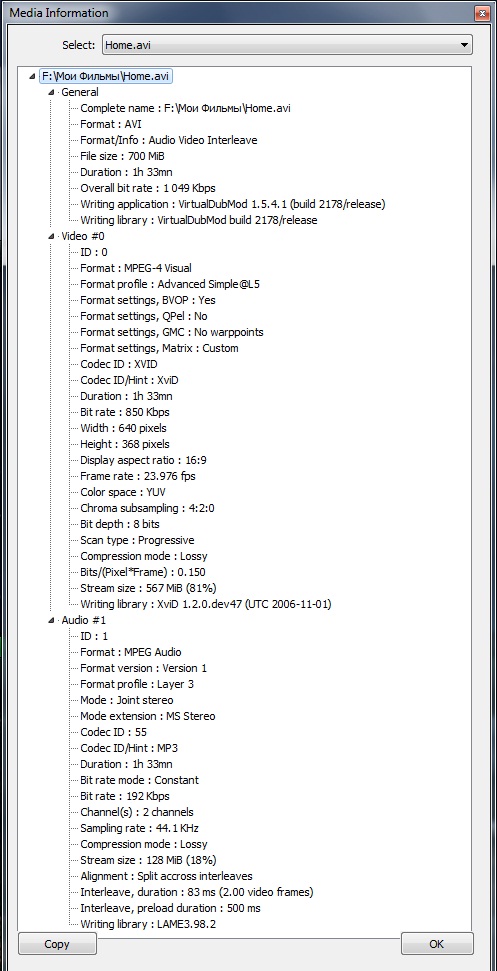
Right-click on the file name in the list of KMP and you get a window with all the possible and impossible tech details, with the all-powerful Copy button

-
Hey geographer is here
Well…I guess we all like our own method to do it lol (underlvr's method works great too, I tried it with MPC, after having read his last post)A few hours ago, I used MediaInfo to add the technical infos in a torrent I just uploaded.
As I wasn't very satisfied with the preceding default output (i.e the pic "1_quick_infos.jpg" in my last message) then I added a couple of things in the open template script.Some adding code went like that: $if(%CodecID/Hint%, (%CodecID/Hint%****))
I forgot the ** and it got me nuts during 10 min, depending on whether the movie had a codecID/Hint or not :crazy2:
Here is how it appears actually in the torrent description page :Format : AVI
Length part 1 : 218 MB for 22mn 42s 625ms
Length part 2 : 222 MB for 23mn 06s 867ms
Length part 3 : 221 MB for 23mn 05s 587msVideo #0 : MPEG-4 Visual (XVID) at 1 201 Kbps
Aspect : 640 x 480 (1.333) at 29.970 fpsAudio #0 : MPEG Audio (MP3) at 128 Kbps
Infos : 2 channels, 44.1 KHzIt worked :cheers:
-
@Uwe:
Another idea might be to create a High-Quality category (similar to DVD-R) with minimum standards. I have seen torrents listed (HQ) in the description but are not what I would consider to be high quality.
"HQ" is an attribute originally given to the VHS standard improvements (not really High Quality), then used for DivX/Xivd using decent quality encoding settings i/o of pressing the size to one 700 MB CD-R by all means. Still such a "HQ" AVI got a lower quality than the original DVD.
IMHO what you are looking at, is a HD (High Definition) section, something which should be discussed in it's own topic. I would set the minimum requirement to a resolution of 720x1280 pixel, but that is not all, the codec/bit rate combination must be good, too;
.
We got already the ~HD tag, so uploader can tag their clips (there are many in HD) or movies being in HD by it.Honestly, I don't really care enough to start a new topic. It was just a thought about creating standards for these tags/categories. There is nothing right now that would keep an uploader from adding it to all of his torrents whether it applies or not.
-
So, when viewing this information, what are the main things to look for;
when there is more than one copy of the same torrent, what tells the leecher
to "Pick me! Pick me, I'm worth downloading over the other guy's!"?
To be honest, if there is only one copy of something I'm looking for,
I don't concern myself with that information, download it anyway.If this is info is in another thread, please direct me there.
Thanks
"nofish" -
Sometimes users upload torrents with good to very good screenshot quality; then after loading the torrent the resolution is very small and the quality is as bad either so that people are being disappointed - if not - deceived by screenshots.
I assume you mean publicity "stills" rather than "grabs" / "contact sheets" made from the movie by the poster..
Why don't posters [who use windows as their OS] simply include an "image grab", made with "image grabber2 / or 2.net".. or "Video Thumbnails Maker2" [both are freeware] & set the options to show the video & audio details..
see attached eg.Downloaders can then judge quality before DLing..
PS.. I voted NO..

-
I assume you mean publicity "stills" rather than "grabs" / "contact sheets" made from the movie by the poster..
Why don't posters [who use windows as their OS] simply include an "image grab", made with "image grabber2 / or 2.net".. or "Video Thumbnails Maker2" [both are freeware] & set the options to show the video & audio details..
see attached eg.Downloaders can then judge quality before DLing..
PS.. I voted NO..
I voted YES and I agree with Wombat. The contact sheet should be mandatory (1 per video file in the torrent), especially when they can be so easily generated. For those studios where preview images are not allow, the codec and resolution info should be included in the description and the contact sheet(s) included as part of the torrent.
On the other hand, how much info are needed? For me, I usually just look at the video resolution (height) and file format.
-
I can say, quite honestly, that if the info were required, chances are real good that none of the 25 torrents I uploaded so far on this site (in the 7 months since I've joined), would have been uploaded…at least not by me. (But that doesn't mean I don't put a lot of effort into my uploads, with descriptions, pics, links, tags, etc., which has earned me auto-approval (and no warnings.)
Sure, you're gonna get the occasional "less than stellar" video quality. But as someone who has approximately 7 TB of porn, including thousands (probably more like tens of thousands) of full videos, clips (short and long), full DVD rips, etc I'd say the number of bad downloads aren't even a blip on my radar. Hell, I'm more incensed about seeing condoms in a video categorized as "bareback". Again, that's just me.
-
Too many people don't follow the upload rules and force us to send them messages about what needs to be done so their torrent can be approved as is.
Some people never fix their torrents and they eventually get disapproved.
The flow of new torrents would definitely slow down, and the amount of new torrents probably would noticeably decrease.Good picture quality is nice and all, but poor quality videos never stopped me from "completing a mission".
-
This place lives from the uploader and downloader. Most are not tech skilled. Many struggle to do their first upload (it was a real headage for me). Many will not be able to interprete th given information either. As said upon, making such requirement will put another burden to uploads.
Anyone who downloaded the torrent, being able to reveal the information (for example using MediaInfo) could post a comment adding this information … for example on torrents were he was disappointed about the technical picture quality. Of course best without any negative remark, just the technical information. Then other later downloader can decide on their own to go for it, or not.
-
I would go further with this idea and suggest users who are willing to share such information about their downloaded torrent to send it to moderators, so we can insert it in the description.
Though I really doubt the majority of users pay any attention to what is written in the description. Moreover they will pay any attention to the tech details, since most of them have no idea about bitrate, codecs, containers and so on…




Hello! It looks like you're interested in this conversation, but you don't have an account yet.
Getting fed up of having to scroll through the same posts each visit? When you register for an account, you'll always come back to exactly where you were before, and choose to be notified of new replies (either via email, or push notification). You'll also be able to save bookmarks and upvote posts to show your appreciation to other community members.
With your input, this post could be even better 💗
Register Login