Upload guide for qBittorrent
-
Start seeding must NOT be ticked, because it would start seeding the torrent before having uploaded it, i.e. with the wrong tracker URL without passkey.
As to the "Private" box, it is better to tick, so that the created torrent will have the same hash than the later re-downloaded. Changing that setting changers the hash, changing the tracker doesn't change the hash.
geographer: added
-
Thanks, Uwe!!
:hug2: -
Hey, geo!
Do I have your permission to translate the guide and post it in the Greek Board?
Naturally, due credits will be given to you for the creation of the guide.
Can I make minor modifications, such as substituting the images with images from qBittorrent for Windows?
:hug2:
Now, I have a few notes to make about the guide.From your first post:
@geographer:Its main advantage is support for all major platforms: Windows, Linux and Mac OS X.
I'd expand it a a bit, ie.:
Its main advantage is support for all major platforms: Windows (2000/XP/Vista/7), Mac OS X, Linux, FreeBSD, OS/2 (eComStation).From your first post:
@geographer:This guide offers 5 easy and explained steps
Since you abandoned Step 5, it's now 4 steps.
From Step 3:
@geographer:6. In the field Description type a short description of the movie, picture collection or musical album.
Musical albums are not allowed anymore.
From Step 4:
@geographer:4. In the popped-up window, click the button from the red rectangle from the below image:
Note: If the "Start Torrent" box is checked, clear it before doing anything else.I'm not sure which the red rectangle is.
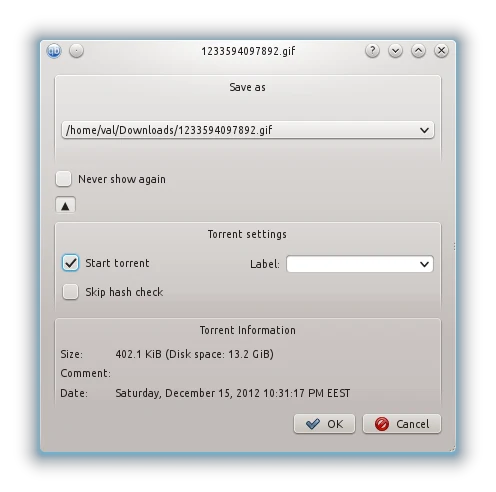
From Step 4:
@geographer:6. Now watch carefully qBittorrent's main window. If the application found the correct data, you should see the scale from the column Done rising to 100%:
If this happened, you will notice a green upward arrow next to the name of the torrent. This means the torrent went into seeding mode and it is ready. Follow up Step 5 for further instructions.
If this didn't happen, the scale remained at 0% and the torrent started to download, which you don't want to.a) Are you sure the upward arrow is green? In my qBittorrent it appears orange.
b) Follow up Step 5 should be deleted, since there's no Step 5 anymore.From Step 4:
@geographer:11. Finally, you need to start the torrent. In order to do that, click Resume button from the already known instrument panel (green triangle)
The Resume button does not appear as a green triangle in the Windows version. It appears like this

-
Thank you Dax for pointing out all those inconsistencies. All are corrected.
@Dax:
Do I have your permission to translate the guide and post it in the Greek Board?
Yes, of course, but let's wait until it's available in the Guides section, then everyone can start working on translations.
@Dax:
Can I make minor modifications, such as substituting the images with images from qBittorrent for Windows?
Sure.
-
All in the days work

I'm glad to see you back, Mike. I wanted to ask you if there is a way to re-upload qBitttorrent in the Download offers section. I understand you had to split the install file into 4 parts because your internet speed, but can anyone else upload it, so it can be preserved as one file?
[off-topic]
I find your new signature disturbing And right now I feel glad I don't own a cat
[/off-topic] -
@mgr:
alas that won't work. That upload works by PHP-scripts, for security reasons there is no FTP account on our servers. Uploads by PHP are in our current configuration limited to 2 MB per file
 That is the original reason to split the installation files
 Oh, I see… OK then...
-
It's been about 2 months since this guide was written and modified. Isn't it about time that it is moved to the Guides section?
-
I did all the steps, imported the torrent I downloaded from GT. Paused it, set the location, did a force recheck but the %age done does not go up at all, it stays at zero percent. What do I do now?
-
That would mean the location was wrongly set. you need to select the folder which contains the data from which the torrent was created and those data file(s) names need nott to have been altered.
Remove the torrent from qBitTorrent and import it again and direct the download location again to the right place.
-
Nope did not change the file name, and also selected the correct folder for where the file is located. Unless there is something to do with the sub-directories that is screwing things up??????
-
If you create a torrent to share the content of a folder (directory), that folder name, it's sub-folders structure & names and files places, names & content must remain intact.
You must direct the download to the folder which contains the folder from which the torrent was created (1 level up).
As remark, you can add files to the folders not present in the torrent's file list.




Hello! It looks like you're interested in this conversation, but you don't have an account yet.
Getting fed up of having to scroll through the same posts each visit? When you register for an account, you'll always come back to exactly where you were before, and choose to be notified of new replies (either via email, or push notification). You'll also be able to save bookmarks and upvote posts to show your appreciation to other community members.
With your input, this post could be even better 💗
Register Login