Downloading
-
"I'm using qBittorrent v5.2.2 on a Windows 10 Operating System. I've recently uninstalled and reinstalled qB, and made no system tweaks, so it should be "out of the box".
I use Tonguard for my VPN service.
I'm unable to either download from, or upload to, GayTor, though I've been able to from other sites with little or no difficulty.
When I launch the .torrent file, the tracker number is correct (checked against my profile) but it gives four different IP variants. I'm told this is "strange" and that there's normally only one.
Can anyone suggest a cause and solution? Or is there any other info that's needed to diagnose the problem?"
-
@trkr4life it's not strange at all, you can configure qbittorrent to bind to a specific network adapter or even a specific IP, but out of the box it will show all available addresses. Normally you'll only see one ipv4 address and one ipv6 address, from your regular internet provider. But if you have a VPN running, it can add many more addresses, which it uses to prevent certain applications from leaking your real ipv6 address.
The fact that there are multiple IPs is not indicative of anything wrong, in your screenshot I can see that the VPN IP has a "updating" status while the rest is unreachable/not working, which is expected when your VPN is connected. You need to check what message you get after the initial "updating" status is replaced with a more definitive status, to know if it's the tracker that's blocking you, or if it's the VPN.
-
@ianfontinell I was the one that said it was strange, purely based on my own experience. I've never seen multiple entries there in either qB or uT. As I said, to @trkr4life "no doubt I'll feel like an idiot"!
Anyway, every instance he has shared with me has shown all IPs to be either "not working" or "Unreachable".
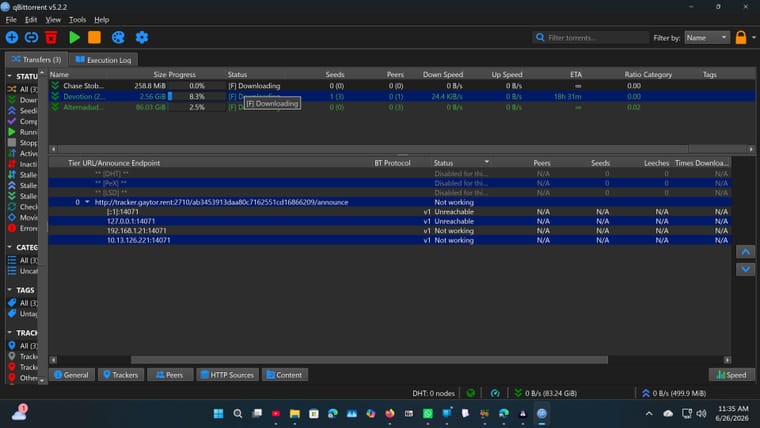
In the case of the first screenshot, the tracker had been downloaded a few minutes before, so maybe hadn't made a first attempt on the "updating" one.
-
@Kevin4fm @trkr4life "not working" status in the VPN IP points to a VPN-related issue.
Make sure that you are not using split-tunneling, so that all network traffic is forced to go through the VPN, and then try to access this URL: https://tracker.gaytor.rent/stmddIf this page loads, but you're still getting "not working" in your client, try connecting to a different country, or check if the VPN has servers dedicated to P2P.
-
@ianfontinell Thanks. We'l give that a try, and report back.
-
Just to set minds at ease: the tracker and downloads are healthy across the site right now, there's no outage on our end. We had a brief server hiccup on the 24th that mostly affected uploads, but that's been sorted for a while now.
ianfontinell has this spot on, what's happening here is a VPN/client thing rather than the site. A few things that usually fix it:
- In qBittorrent, bind it to your VPN's network adapter (Options > Advanced > Network Interface) so it stops announcing your other IPs. Out of the box qB lists every address, and the ones not routed through the VPN show as "not working", which is expected.
- Make sure split-tunneling is off so all torrent traffic actually goes through the VPN, and that your VPN allows P2P on the endpoint you're connected to.
- If your VPN puts you on CGNAT or IPv6-only, try an endpoint that gives you a normal IPv4 address.
Give that a go and let us know if anything is still stuck, with your torrent and client details, and we'll dig in.
-
@Joker @ianfontinell Thanks both for you help and advice.
In qBittorrent, bind it to your VPN's network adapter (Options > Advanced > Network Interface) so it stops >announcing your other IPs. Out of the box qB lists every address, and the ones not routed through the VPN >show as "not working", which is expected.
This may be where I picked up the "one IP address" idea from. My own VPN is bound, and all torrents announce just the same one in all cases.
We've established it's definitely a VPN issue. @trkr4life can download and upload fine when not hidden behind it. He's going to reach out to Torguard's technical team for advise on how to properly set things up. On the plus side, Torguard offers port forwarding as standard on all their plans, even the base one, so he'll be well served once it is properly configured.
-
@Kevin4fm i talked to them they told me that my Vpn doesn't work in USA so they told me to switch to Toronto Canada and i did and its been workin fine!

-
Thanks everyone for all the great help i recieved!
-
@trkr4life That's excellent. Did they tell you how to set up port forwarding? Getting that right is going to be a major win for you.
If not, let me know and we'll try to work it out together. Once you have it sorted, while I'm waiting to sort my own VPN out, I may be coming to you begging for you to join a swarm, just so I can grab what's on offer!

When you're ready to try a multi-file torrent, just DM me. It's just a little different, but still dead easy.




Hello! It looks like you're interested in this conversation, but you don't have an account yet.
Getting fed up of having to scroll through the same posts each visit? When you register for an account, you'll always come back to exactly where you were before, and choose to be notified of new replies (either via email, or push notification). You'll also be able to save bookmarks and upvote posts to show your appreciation to other community members.
With your input, this post could be even better 💗
Register Login