How to seed?
-
@DeepSeaTide you can't seed with a free VPN because port-forwarding is a premium feature and only a handful of providers offer, like Proton and PIA. Most VPN providers don't have port-forwarding even for their premium subscribers.
-
So does that mean I can't seed and earn the funny seed bonus here since I don't have a consistent income to pay for a premium VPN and whatnot?
Does this also mean if I try to seed or torrent anyway it'll be VERY risky?
-
@DeepSeaTide said:
So does that mean I can't seed and earn the funny seed bonus here since I don't have a consistent income to pay for a premium VPN and whatnot?Does this also mean if I try to seed or torrent anyway it'll be VERY risky?
About the first part, it is more than just the funny bonus... If you are unable to seed, your ratio will plummet very quickly and eventually you won't be able to download anything.
About it being risky without a VPN, it depends a lot on where you live and what you are downloading. If you are in the US, it is very risky, a VPN is a basic requirement to torrent if you live there.
On most other countries it's not as risky, if you only use torrent for downloading stuff on this site. But if you also use it to download movies, tv shows, music, then it is very risky to do it without a VPN.
-
So since I can't use a VPN and I only plan to torrent and seed stuff from here, I should be reasonably safe as long as I don't do it too much to arouse suspicion from the network providers?
(I'm not in the US)Also, do you know if VPNs like Windscribe or Privado are good? They seem to allow torrenting with the free versions.
-
@DeepSeaTide said:
Also, do you know if VPNs like Windscribe or Privado are good? They seem to allow torrenting with the free versions.I don't know, you could try... Just be aware that free VPNs limit your total traffic so when you download/upload traffic reaches that limit the VPN will stop working.
-
By the way, do you know how to make it so that my VPN's data is ONLY used for seeding/torrenting? I'm currently using Windscribe so I have to conserve my 15 GB of data.
Seeding requires the VPN to be active, right?
-
On a side note, Is it a normal thing to have every download be "Stalled"? Can't quite figure out what's wrong.
-
"Stalled" means there's no activity.
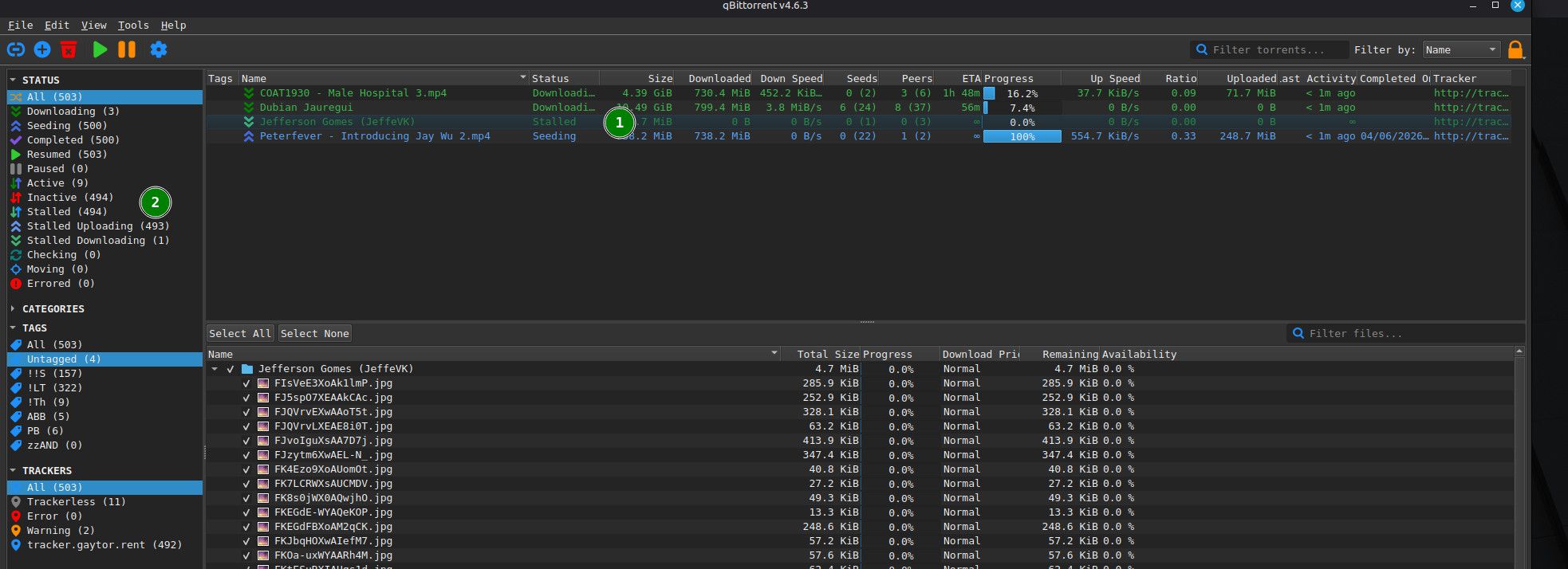
If it's showing in the main window against an individual torrent (1), it means that a torrent either hasn't started downloading yet or the download has been interrupted - for instance the seeder you were downloading from has temporarily disconnected. You're downloading "leeching") it, but it hasn't yet completed.
"Stalled" in the left-hand summary panel is a total of torrents that are not currently active (2). In my qBittorrent, it shows the total, and the split between stalled downloading and stalled uploading. Uploading (or in this case available for upload) show against the individual torrents as "seeding", but with no current activity. These are the torrents you'll get bonus points for - you're not actually seeding them, but are ready to, should anyone want them.
-
Problem with mine is that ALL of them are stalled at 0% and just won't start at all. I've tried to download some from the freeleech section so that I could try out seeding, but nothing is downloading. I think the status in the tracker said "Not working"
But strangely, it started working now as I was typing this and I still have no clue what made it work.
-
Strangely, it seems to go down whenever I switch on my VPN, for some reason. As I mentioned before I'm using Windscribe and I'm pretty sure that is one of the few that allows torrenting with it active. Hmm...
-
@DeepSeaTide I'm not familiar with Windscribe, but according to my AI friend, whilst it used to allow torrenting on its free plan, with a monthly data cap of maybe 10-15gb, reports are that it doesn't any more, allowing it only on its paid plan.
Torrents starting to download when you turned it off and stopping when you turned it on may have been a coincidence if it happened once, but seems unlikely. Simply try it a few more times. If it keeps happening, it's not a coincidence. They're definitely related, and that way round - on doesn't work, off does - I can't think of any other explanation other than that the VPN is blocking the traffic.
-
Proton lets me torrent, surprisingly. Dunno how or why, but I should probably try to get the premium version. Maybe? Connection is a little slow, but it IS the free version, after all.
As for Torrents downloading, I did it several times and they all had the same thing where the download started whenever I switched it off (Windscribe).
By the way, am I supposed to set "Network Interface" as Any Interface or set it to the VPN I'm currently using? I saw a guide that says to set it to Any Interface.
-
...It's stopped again. And I still have not one clue to why. The tracker status has become "Not Working" again.
-
This could be down to free VPNs' monthly torrent download limits. 10-15gb isn't very much so you may have already reached it with both VPN services.
I'd start by making sure qBittorrent works with no VPN in the mix. Make sure the VPN(s) are properly closed, not just disconnected. If you're using Windows, use Task Manager to make sure all VPN services are stopped, not just the main interface. If you're still not sure, reboot. But first, make sure your VPN is NOT set to start when the system does. There's usually a simple toggle switch or dropdown to turn this feature on and off. Also, pause all of the torrents in qBittorrent.
Once you're sure there's no VPN anywhere in the mix, start qBittorrent, then start one or two torrents. See if they start downloading. Of course, seeders may not be connected to the one(s) you've chosen, so if they don't start, pause them again, and try a couple more.
Once we've confirmed qBittorrent works with no VPN interference, we can start looking at why it doesn't work when the VPN is running.
-
Yeah, it works fine without the VPN active and it only doesn't quite work if I have a VPN Active. Windscribe just flat out doesn't work, and Proton is very slow. But that being said, I am using the FREE version of Proton so I'd assume the servers are kinda congested.
Should I buy the subscription for Proton, or do you have any VPN recommendations? The only other option is trying to be careful while going without a VPN, but I rather not do that.
-
@DeepSeaTide I use ExpressVPN, which I find really good on the whole. It has one important feature: "Split tunnelling". This allows you to set a general rule to use the VPN or not use the VPN, but then specify something different on a 'per app' basis. So, for example, you can set qBittorrent to only work if the VPN is connected. If it stops for any reason, qBittorrent stops too, so you don't risk being exposed. But your browser you can set to use the VPN if it's working, but carry on if it's not. Or even, to never use the VPN. There are some sites I visit that just won't connect if it's via a VPN. With that setting, I can happily browse, while qBittorrent is still working away through the VPN.
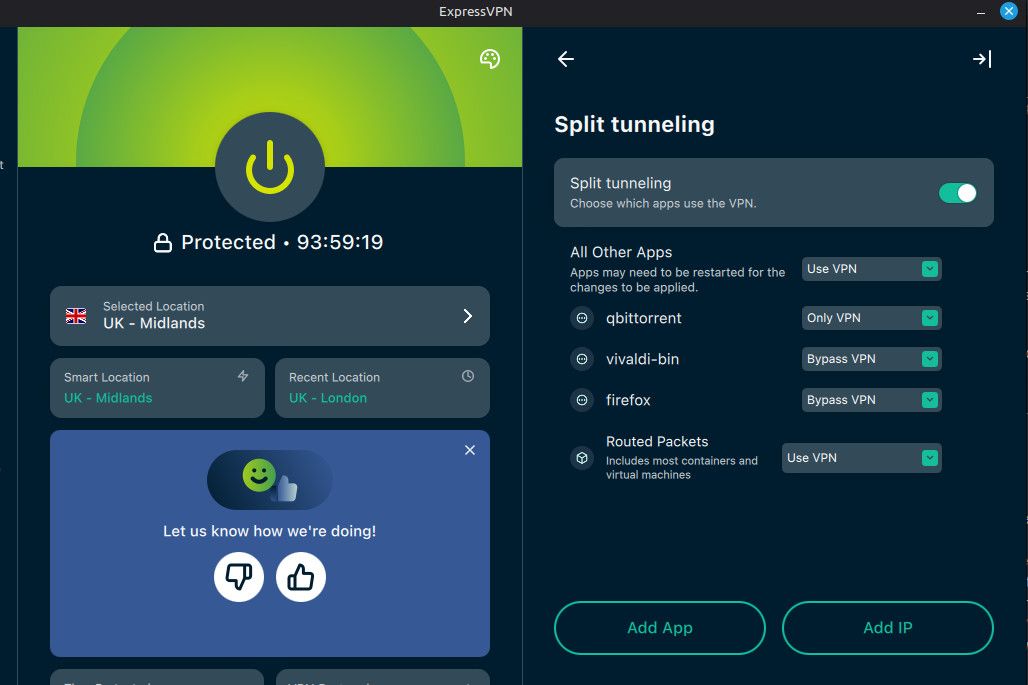
The one downside of ExpressVPN is that it doesn't allow / support port forwarding. Most VPNs don't. Torrents will work without it, so long as one person in the swarm has it. Think of it as everyone being able to talk and saying "have you got...?" or "I've got...". But only one person can hear what's being said so know when and what they've been asked. (Not a brilliant analogy, but close enough for now.)
According to my AI friend, here are some VPNs worth checking out:
Proton VPN - Included in paid plans - Probably the easiest mainstream option. Dynamic port assigned by the VPN.
AirVPN - Included - Long-time favourite among torrent users. Supports multiple forwarded ports. More technical interface.
Private Internet Access (PIA) Included - Still supports port forwarding and is often recommended specifically for qBittorrent users.
PureVPN - Included on supported plans - Less commonly recommended by torrent enthusiasts but still offers it.
I've not looked at any of these myself yet, but will definitely be doing so when I need to renew my annual subscription.
Other opinions are also available. They're not right, obviously, but they are available.
-
Oooh, interesting! What makes AirVPN and PIA good specifically for torrenting? And are they better than Proton?
And between Air and PIA, which seems to be talked about more positively?
(at least, from what you know)On another side note, do I also have to use a VPN while seeding, or is it just the Torrenting part that's risky?
-
I don't know about the differences between VPNs myself, was just posting what my AI told me when I asked about those which provide port forwarding. I suggest just googling (or DuckDuckGoing, given how intrusive and AIcentric Google has become) "Best VPN for torrenting".
Your sidenote: Yes! "Torrenting" is the collective term for the whole thing. The "torrent" is the file that matches people who want a file with people who have it. Torrents can be "public" or "private". If you download a torrent from, say "thepiratebay", these are public. You'll see there are multiple trackers. If you look at the torrents you download here, they'll have only one tracker - gaytor.rent. These are private. They're only accessible / usable by other members of this site.
While you are downloading the file, it's called "leeching". Once you have it, if you leave the torrent running so others can download from you, it's called "seeding". The two aren't mutually exclusive, so you may well be seeding whilst still leeching. You're sharing those bits of the file you've got so far with others who need them. But technically, you're still a "leecher".
If a torrent has four files but you only want two of them, so untick them in qBittorrent so the two you don't want aren't downloaded, you'll still be a "leecher" even when the two files you wanted have downloaded and you're seeding them. This is relevant because they'll always be counted in the downloading side (down arrow) here in your to menu bar.

This means that they'll always be taking up some of your download slots, of which you have a specified number according to your ratio, how many torrents you're seeding, and other variables.
To get them out of the download count you either need to complete the torrent (download all four files) or delete the torrent from qBittorrent... which means you're also no longer seeding it.
-
One more thing for now, what does the Network Interface thingie do? If I set it to ProtonVPN (For example), does it make it only torrent stuff while ProtonVPN is active whereas "Any Interface" keeps it going even if the VPN goes down?
-
@DeepSeaTide "Network Interface" tells qB which route(s) it can use to the internet to work.
If you use "Any interface", even though it might normally use your VPN if the VPN fails for any reason, it will just fall back to direct internet access.
Giving a specific access - e.g. your VPN - means that if the VPN stops working, perhaps because you've simply disconnected it, or actually closed down the VPN app, qB will stop working. You can tell your VPN to only let qB work through it (or at least I can in ExpressVPN. This is fine WHEN THE VPN APP IS RUNNING, whether it's connected or not. But if the app isn't running, there's nothing telling qB "hey, you gotta go through me".
Therefore, binding it to your VPN through qB is a very good idea - assuming you want "No VPN = No torrenting"!



Hello! It looks like you're interested in this conversation, but you don't have an account yet.
Getting fed up of having to scroll through the same posts each visit? When you register for an account, you'll always come back to exactly where you were before, and choose to be notified of new replies (either via email, or push notification). You'll also be able to save bookmarks and upvote posts to show your appreciation to other community members.
With your input, this post could be even better 💗
Register Login