Trying to upload torrant. "Directory is missing key(s)"
-
Hello, I am trying to upload a torrant I made from qBittorrent. But the end when I hit upload I get the message "Directly is missing key[s}" Is there a troubleshoot guide?
-
How are you trying to upload it? Using the "Upload" page?
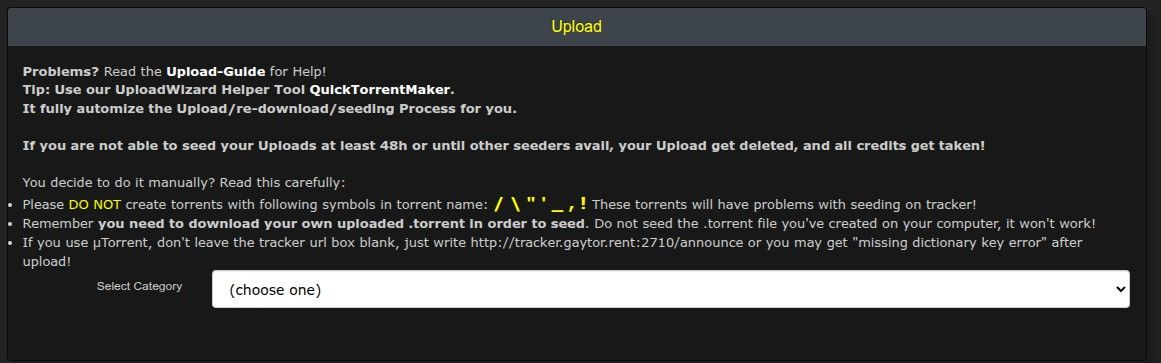
-
@Kevin4fm yes
-
Did you create the torrent using qBitorrent's Torrent Maker? If so, paste a screenshot of that here.
It should retain all the information from its last use, so all you need to do is open it as if you are going to make another torrent. Take the screenshot, then simply cancel it. Or use the example below to create a new version, if yours is a lot different, and try again with that.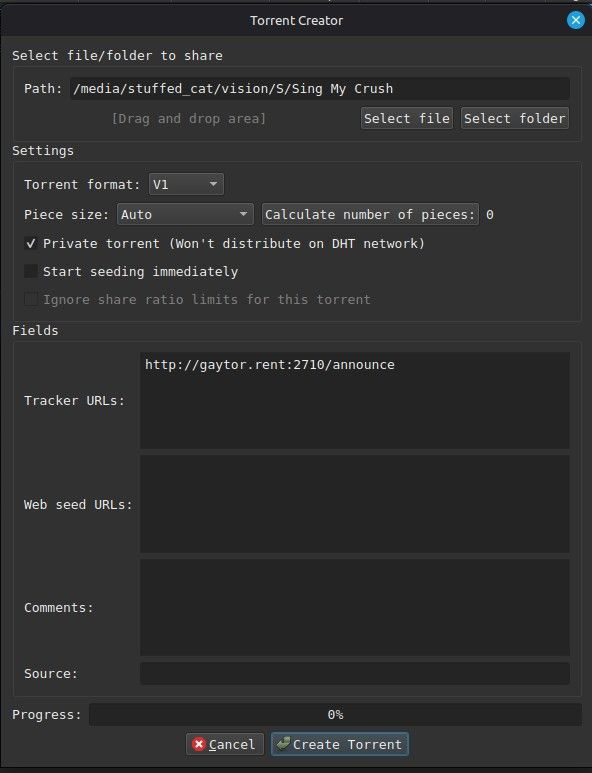
If that fails, or you're confident your looks pretty much like this one ("Tracker URLs" needs to be EXACTLY like this one, not "pretty much") take a screenshot of the completed upload page, and post that here so we can see what you've filled in where.
-
@Kevin4fm ok I wasnt aware of tracker field. Everything else is same
-
The Tracker URL is vital. That's the core bit of info. so it's likely the cause of your failure.
That will always stay the same for every torrent you upload here, and it will stay there in Torrent Creator's memory until you delete or change it. I'll type it below, so you can just copy and paste it:
http://gaytor.rent:2710/announce
Make your torrent again, but with that, and ONLY that, in "Tracker URLs", then select that new .torrent file in the Upload page.
-
@Kevin4fm it worked. Thank you.
-
Excellent. It's one of those things that's really obvious ... once you know it. I doubt you'll forget it again.
Happy torrenting.

Hello! It looks like you're interested in this conversation, but you don't have an account yet.
Getting fed up of having to scroll through the same posts each visit? When you register for an account, you'll always come back to exactly where you were before, and choose to be notified of new replies (either via email, or push notification). You'll also be able to save bookmarks and upvote posts to show your appreciation to other community members.
With your input, this post could be even better 💗
Register Login