Some torrents that I don't download everything won't share
-
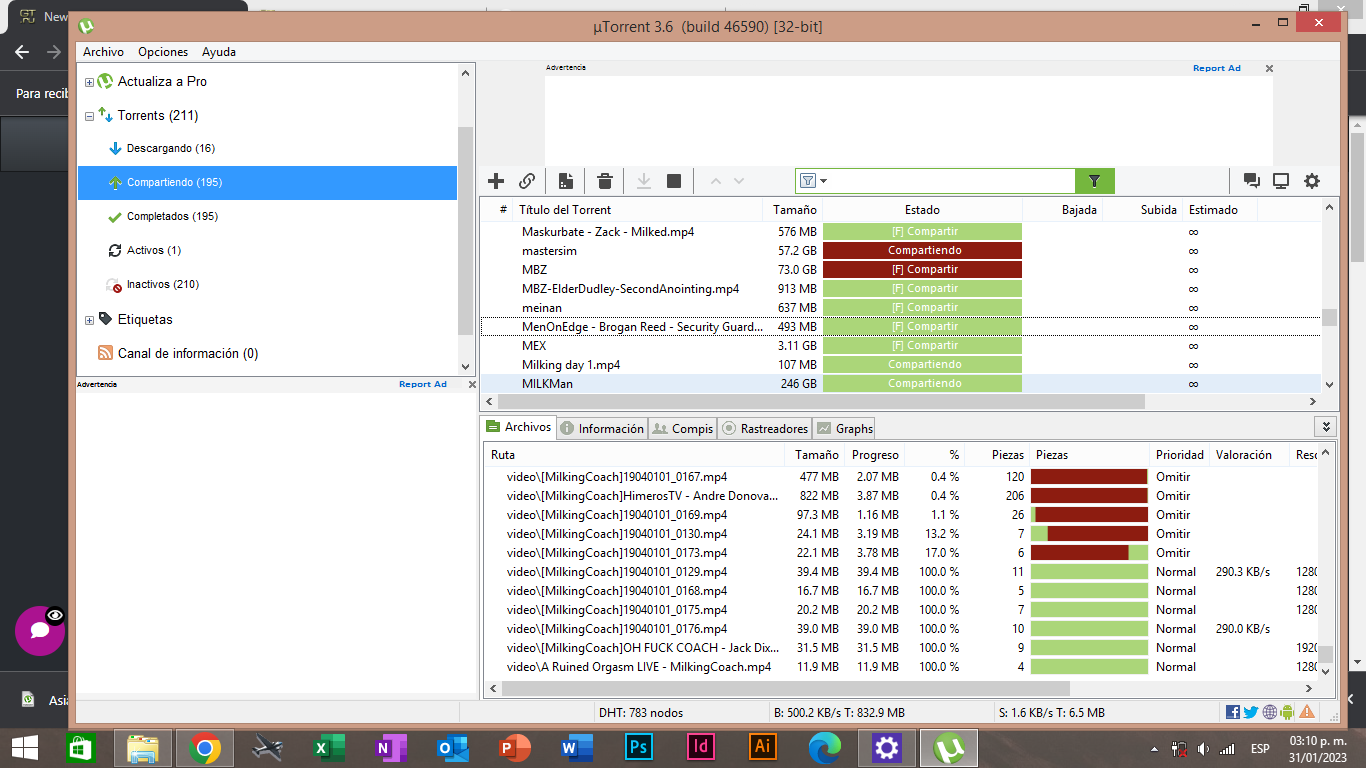
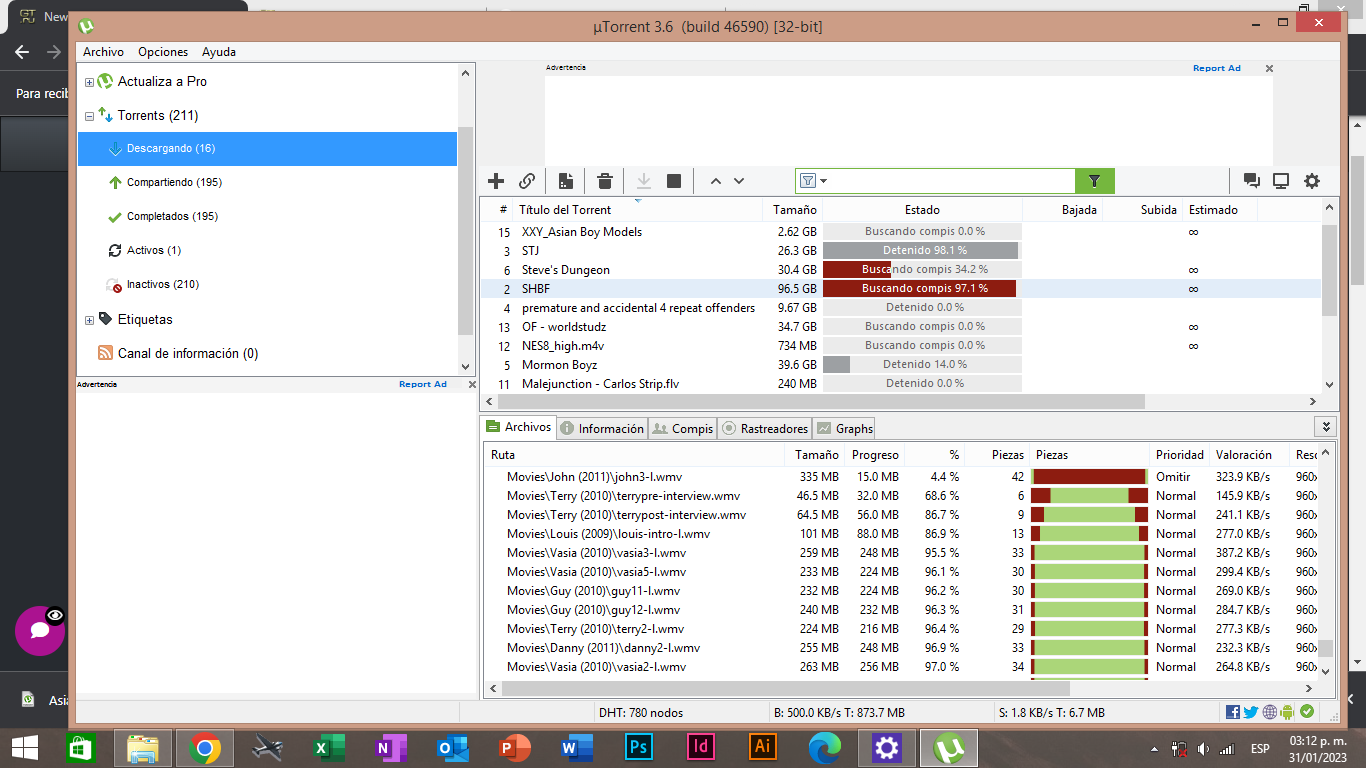
Torrent in red including incomplete are no longer in the system w/c result as Failure/Unregistered Torrent ...
Incomplete torrent are missing [uTorrentPartFile] when torrent deleted and move files from other directory ...
w/c is why finding peers not connecting ...- It's not uncommon for the latest version of an app to cause problems when installed on older devices.
Sometimes newer versions of apps may not work with your device due to system incompatibilities.
This is not a recommendation :
- If you are currently using updated client there is a well known bug aka [wss:bittorrentxyz] invalid URL w/c is preventing tracker from connecting ...
[simply delete and remove] ..
If you want to downgrade from earlier version,
[simply disable your anti-virus] and disable software updates from keeping your client updated ...
https://utorrent.en.uptodown.com/windows/versions
In utorrent point on Options/Preferences/General
Uncheck - Updates & Privacy / Check - Notify me before installing updates ...
[Older versions/Windows only] :
https://utorrent.en.uptodown.com/windows/versions
default connection/port [6881 - 6889]
your settings will be save ...TROUBLESHOOTING:
disable your VPN [it is possible that you are using faulty client w/c preventing you from connectivity] ...
see if your antivirus is blocking the site ...
port forward : https://portforward.com/
firewall setting should be [allowed] ...
reset your router/modem ...
Why is uTorrent not connecting to peers?
uTorrent often fails to download files and gets stuck on connecting to peers due to interference from your antivirus,
your ISP blocking torrent downloads, incorrect uTorrent client settings, or the torrent file itself is dead.
Why won't my Utorrent connect to peers?
Check Your Firewall and Enable Port Mapping
A problem with uTorrent not connecting to peers can often be due to your system or network firewall. - It's not uncommon for the latest version of an app to cause problems when installed on older devices.
-
To make sharing more efficient, torrents are splitted into several small chunks. Each chunk's size varies according to number of files and their sizes.
When you download everything, it's pretty simple, everything gets downloaded and that's it.
When you only select a handful of files, what happens is: some of those files you have selected are part of a chunk that contains other files you haven't selected. What this means, in short terms is: parts of files that you haven't selected must be downloaded in order for some parts from files that you selected to be able to be downloaded.
It's pretty much the equivalent to an Hard Drive's cluster system, a single cluster can have multiple files, having a single cluster damaged means you can have multiple files corrupted, even when they're completely unrelated.
Utorrent and most modern clients create a dump file where those "undesired" chunks are downloaded, those files are important for the integrity check. If you delete those files, some files that you have succesfully downloaded will show as incomplete. The file might be intact, you can play it with no errors, but to the torrent client it'll still be considered incomplete because the rest of the chunk wasn't found.
When this happens, the only solution is to start the torrent and wait for it to download the missing parts again. If the torrent is alive, you'll be able to connect and download. If it's dead, you can just remove it from the list as there's nothing else that can be done.
If both your new and old HDD were in decent shape, all files would have been copied flawlessly, meaning you haven't actually lost anything you've downloaded and kept. If you do a recheck, start the torrent and it says incomplete, you've probably deleted or ignored the .dat files. Those files are necessary for seeding torrents that you haven't downloaded fully.
Reiterating: If the torrent is still alive you can just resume and wait for it to download, if it never connect to any peer it's likely dead and you shouldn't bother.
-
Thanks for the prompt responses. I've tried what you've said but it doesn't seem to solve the problem. Maybe I did not migrate the files with enough integrity. Would someone kindly use TeamViewer to check whats going on? I don't know how to use uTorrent and it was working fine on my other computer but it died.
-
@vasco25 Do you still have your old hdd? You could go back and check for the missing files. Or additionally you could go and check if you have copied them to the new HDD. Those files usually are named "~UtorrentPartFile" followed by a random ID. Like this:
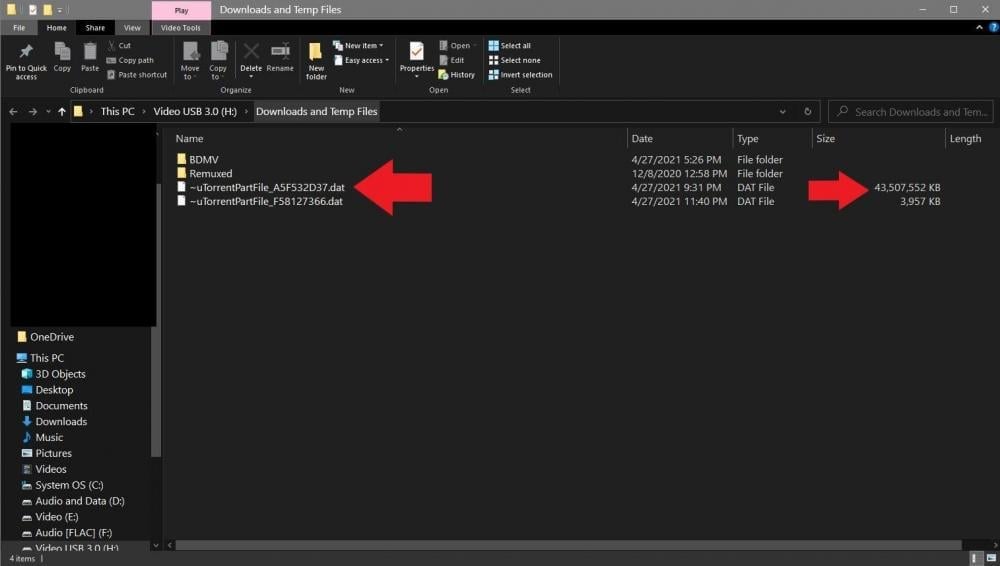
If you have them it's 99% of the job done, you'd only need to go back to your old drive and backup your utorrent user data, which is super easy and I'd be happy to assist you with. Just tell me if you have the utorrentpart files and if your old hdd is still working.
-
@ianfontinell Oh! Know I get it! Sadly I don't have my HDD because it had to be completely restored after I backed up this data. Then that is the problem. Is there a way to solve it? Thanks.
-
@vasco25 Sadly, no. The ones in red that say "connecting to peers" are probably dead, you can check here in this tab inside utorrent:

If the status reports "unregistered torrent" that means it's dead, you'll not be able to complete the download.
-
@ianfontinell Thanks, it show this
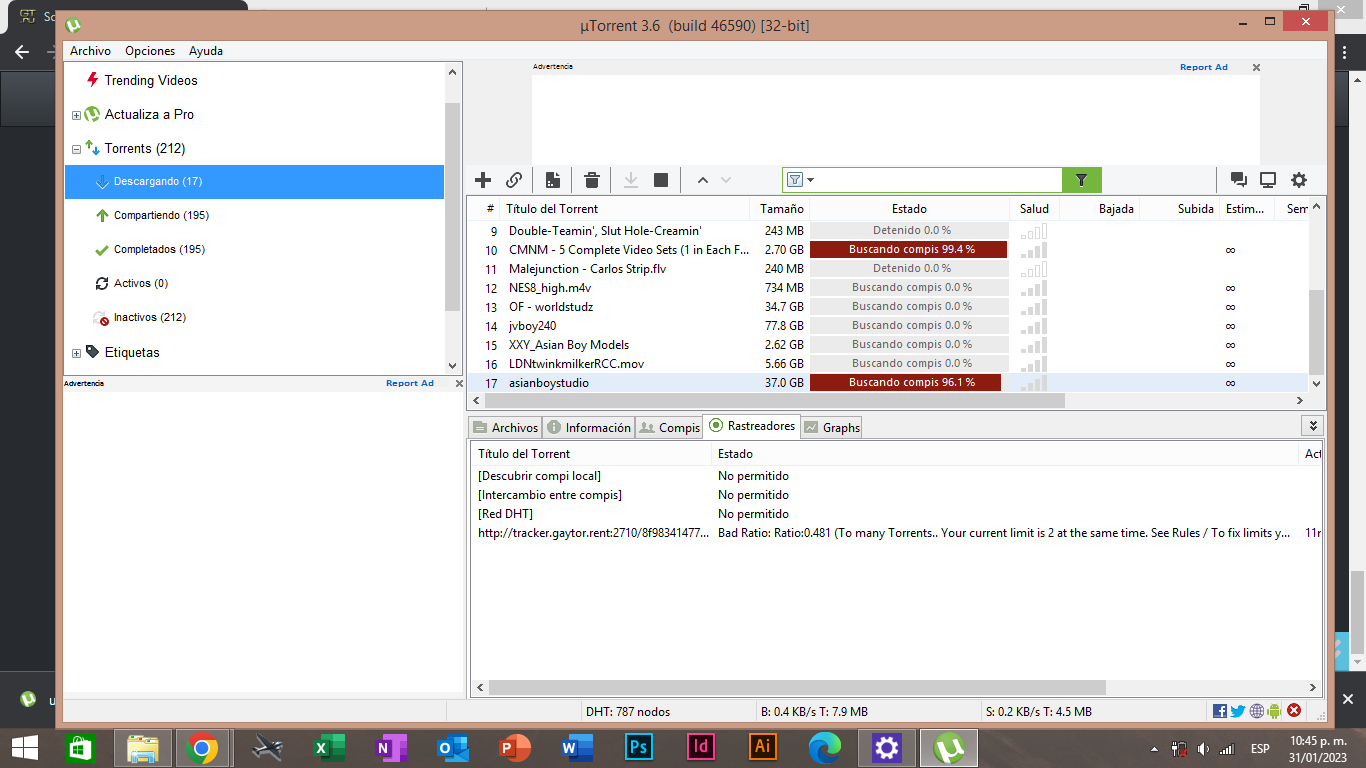
It says something about torrent limit. is it about the same issue? -
@vasco25 This is how many torrents you can download at the same time. This limit is affected by your ratio and how many torrents you have uploaded to the site. Your limit is 2 as of now.
-
@ianfontinell Thanks, and sorry for being so lost on this topic. Another question, sir. Why is it that my completed torrents are not sharing? I've been finding that uploading torrent to uTorrent Web have traffic meanwhile the ones in my uTorrent app are unactive. Why is this happening? Can you help me correct this issue?
-
@vasco25 It helps to not just seed but FORCE seed. And don't expect to upload much after the movie has been on the site for over 24 hours because by then, too many people are seeding it.
-
@ianfontinell But now my ratio is correct and I still get the same message I don't get it.
 Help me please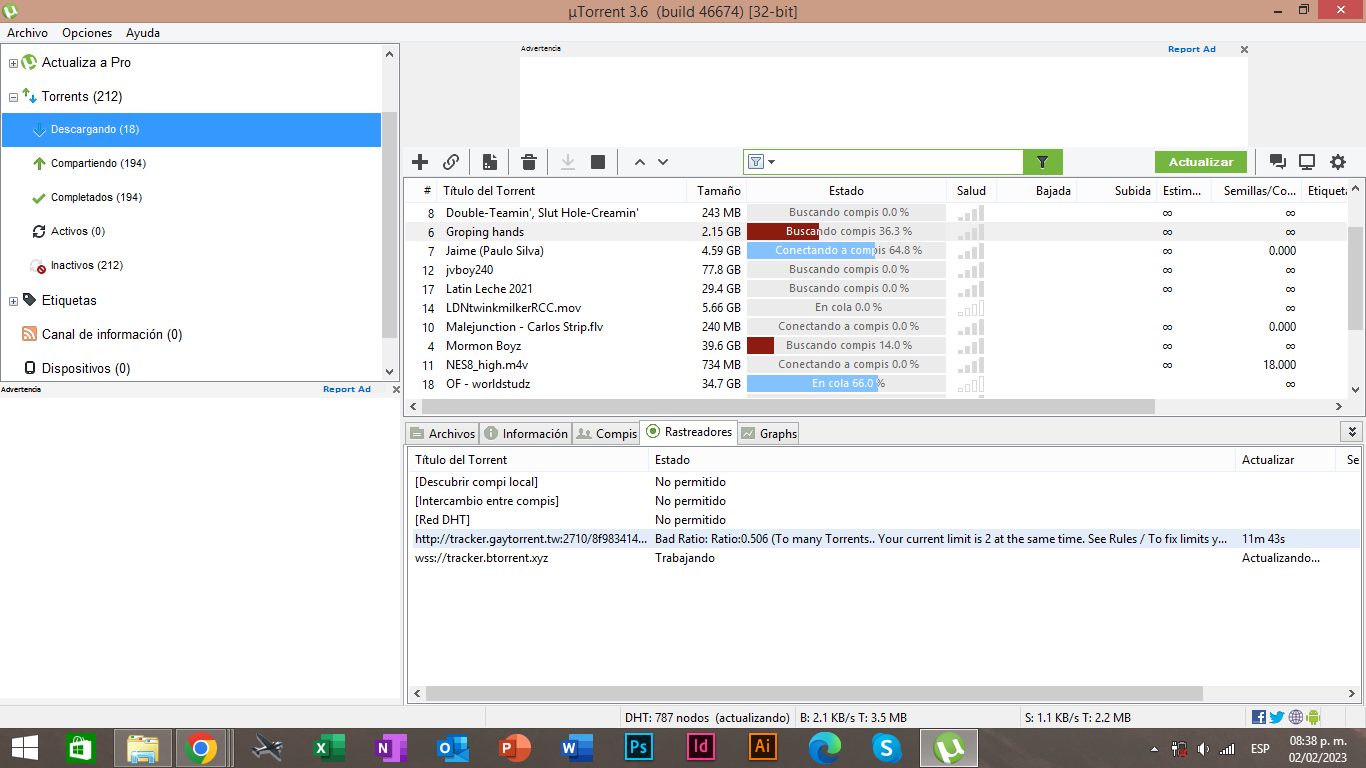


Hello! It looks like you're interested in this conversation, but you don't have an account yet.
Getting fed up of having to scroll through the same posts each visit? When you register for an account, you'll always come back to exactly where you were before, and choose to be notified of new replies (either via email, or push notification). You'll also be able to save bookmarks and upvote posts to show your appreciation to other community members.
With your input, this post could be even better 💗
Register Login