[GUIDE] JustForFans – Downloading Videos
-
Posted this as a reply to a question in the technical thread… Though some others might get use out of it.

So this website in particular is actually so simple to download from... No need for any program other than Chrome.
-
Right click and select "Inspect."
-
Select "Network."
-
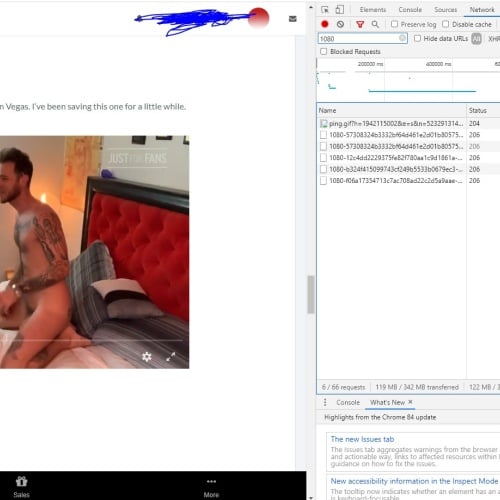
So say you wanted 1080p. Click each video you want to get on the page, adjust your quality to what you would like. Then in the search area of the Inspect type "1080p" or whatever quality you selected.
-
Each video will pop up and it will look like this:
-
Simply right click each link and select "Open in new tab" and the file will ask if you want to save.
Can't believe that was so simple…
-
-
@tiempo dude what is the website??
-
@singlebttm I think that is from "JUSTFOR.FANS"
Hello! It looks like you're interested in this conversation, but you don't have an account yet.
Getting fed up of having to scroll through the same posts each visit? When you register for an account, you'll always come back to exactly where you were before, and choose to be notified of new replies (either via email, or push notification). You'll also be able to save bookmarks and upvote posts to show your appreciation to other community members.
With your input, this post could be even better 💗
Register Login