Working Justforfans downloader?
-
I know Digitalcriminals used to work with JFF but they stopped supporting it as far as I can tell, is there is a current working downloader or how are people downloading from there?
-
I know Digitalcriminals used to work with JFF but they stopped supporting it as far as I can tell, is there is a current working downloader or how are people downloading from there?
I don't know if this is the best way, but what I found that works is the Chrome Extension "Flash Video Downloader". I have to go and hit play and then pause the video for it to show up on the list to then hit the download button, and it's a little sluggish, but it's leaps and bounds better than traipsing through the Chrome Dev Tools to find the Source Files Links. Somebody else might have a better solution though.
-
I was looking for a bulk downloader for Justforfans but can't seem to find one that works. I have been using Jdownloader and just manually right clicking videos; copying their link address; then pasting them in Jdownloader for now. Seems to work well.
-
So this website in particular is actually so simple to download from… No need for any program other than Chrome.
-
Right click and select "Inspect."
-
Select "Network."
-
So say you wanted 1080p. Click each video you want to get on the page, adjust your quality to what you would like. Then in the search area of the Inspect type "1080p" or whatever quality you selected.
-
Each video will pop up and it will look like this:
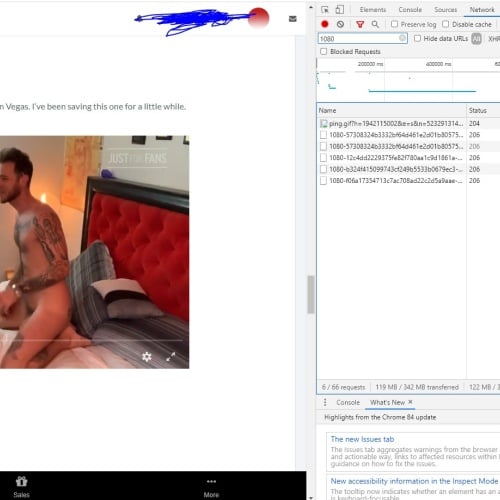
-
Simply right click each link and select "Open in new tab" and the file will ask if you want to save.
Can't believe that was so simple…
-
-
So this website in particular is actually so simple to download from… No need for any program other than Chrome.
-
Right click and select "Inspect."
-
Select "Network."
-
So say you wanted 1080p. Click each video you want to get on the page, adjust your quality to what you would like. Then in the search area of the Inspect type "1080p" or whatever quality you selected.
-
Each video will pop up and it will look like this:
-
Simply right click each link and select "Open in new tab" and the file will ask if you want to save.
Can't believe that was so simple…
Hi, what is that website?
-

Hello! It looks like you're interested in this conversation, but you don't have an account yet.
Getting fed up of having to scroll through the same posts each visit? When you register for an account, you'll always come back to exactly where you were before, and choose to be notified of new replies (either via email, or push notification). You'll also be able to save bookmarks and upvote posts to show your appreciation to other community members.
With your input, this post could be even better 💗
Register Login