QTM (Quick Torrent Maker) Installation, Advice, Known Issues UPDATED Dec. 01, 2021
-
Hi
Sorry to disturb you but I'm desperateI had a problem with my computer so I did a reboot
Since then the QTM doesn't work – I can't upload because the category tab won't drop
I tried everything
Install and reinstall
Uninstall my antivirus
Reboot my computer (again)Nothing worked
Any idea? -
Hi
Sorry to disturb you but I'm desperateI had a problem with my computer so I did a reboot
Since then the QTM doesn't work – I can't upload because the category tab won't drop
I tried everything
Install and reinstall
Uninstall my antivirus
Reboot my computer (again)Nothing worked
Any idea?I have the same problem as you have unless anyone can help it is a case of a fond farewell from me to this site, I have uploaded lot's of files to the site but now it looks like a goodbye from me? But I hope not HELP anyone?

-
Hi
Sorry to disturb you but I'm desperateI had a problem with my computer so I did a reboot
Since then the QTM doesn't work – I can't upload because the category tab won't drop
I tried everything
Install and reinstall
Uninstall my antivirus
Reboot my computer (again)Nothing worked
Any idea?I have the same problem as you have unless anyone can help it is a case of a fond farewell from me to this site, I have uploaded lot's of files to the site but now it looks like a goodbye from me? But I hope not HELP anyone?
It has also come to my attention that I no longer receive messages to seed files that I downloaded before
Like when someone hit the "Request Reseed" button usually I get notification asking to seed the file.Whatever the problem is, please fix this. I need to upload to maintain my ratio
-
i just tried qtm on the latest win10 version.. categories show up.. i cannot reproduce this problem
did you changed your password? check the login credentials again…
-
Hi
Sorry to disturb you but I'm desperateI had a problem with my computer so I did a reboot
Since then the QTM doesn't work – I can't upload because the category tab won't drop
I tried everything
Install and reinstall
Uninstall my antivirus
Reboot my computer (again)Nothing worked
Any idea?Quick update
I upgraded to Windows 10 and the QTM is now working
I think Win 7 is no lo longer supporting QTM (esp if you have the updates like what I did)
sorry for crowding this thread
Peace -
QTM is designed to work with uTorrent; We recommend "uTorrent Classic"
…If you don't yet have uTorrent installed, please go HEREFirst, Downloading and Installing QTM Successfully:
BEFORE you download and install the most recent version of QTM, you MUST uninstall the OLD version first. In Windows, click on your Start icon, go to the programs group (click All Programs) and scroll to the QuickTorrentMaker folder. Click on the folder icon to expand it, then click on the "uninstall" selection. When asked "Do you really want to uninstall QuickTorrentMaker?" click the "Yes" button, to confirm, and click "Yes" on any following confirmation messages.
NOTE that the graphics below refer to QTM version 1.11, but should (in essence) be IDENTICAL to version 1.14
Next, {see antivirus notice below} download the QTM installer program from the Main QTM page, {click here}
Click on the button at the bottom of the page.
If you're having problems downloading the QuickTorrentMaker_1.14.exe program (probably due to protection software on your PC) this should work for you. I've provided an alternative location, from which to download a compressed version of the program.
The file is compressed in RAR format, so you'll need WinRar or similar program to to unzip this file into the original 2,102KB file size QuickTorrentMaker_1.14.exe
Please click on this next link to start the download of QuickTorrentMaker_1.14.rar: https://community.gaytor.rent/index.php?action=downloads;sa=downfile&id=53
Download it into your usual Window Download folder.
Once it's downloaded, use WinRar to unzip the original QuickTorrentMaker_1.14.exe program, into your Windows Download folder.
Next, follow the installation instructions below, for a successful installation:
If Windows Defender blocks the install, just click on "More Info" and tell it to install anyway!
Please disable your antivirus program during the download and install of QTM. QTM may set off antivirus warning flags (stupidly) because the QTM program has the function of having you sign in to your membership account here, and enter your password, in order to be a secure program for you and the GayTorrent.ru site. BUT that action is viewed incorrectly as a security breech by some antivirus programs, and thus the download or install of QTM may be blocked, as a result. We can guarantee 100% that there is NO "bad infected program" inside QTM.When asked "Would you like to save this file?" Click the "Save File" button. Choose a place to save it that you can remember, such as your "Downloads" folder.
Find the "QuickTorrentMaker_1.14.exe" installer program you just downloaded, and doubleclick it to start it running.
If Windows Defender blocks the install, just click on "More Info" and tell it to install anyway!
Click Yes on any Windows confirmation window that pops up.Next, pops up:
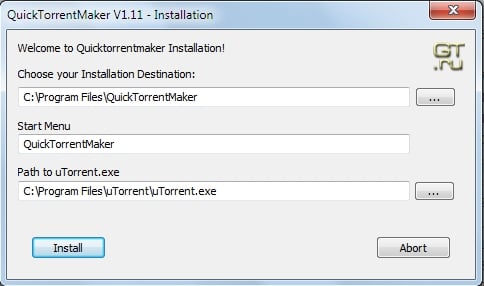
Note the program locations for both QuickTorrentMaker AND uTorrent:
Since (to the best of my knowledge) QuickTorrentMaker is a 32 Bit program, it should be located in:
C:\Program Files (x86)\QuickTorrentMakerIf not sure where your uTorrent program resides, find your uTorrent program icon, do a right click, and choose properties… and look at "Target:"
In my 32 bit windows, it's```
C:\Program Files\uTorrent\uTorrent.exeOn 64 Bit windows computers it is possibly the SAME as above (for 64 Bit versions of uTorrent), or:C:\Program Files (x86)\uTorrent\uTorrent.exe
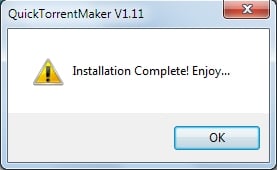
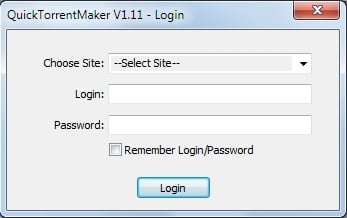
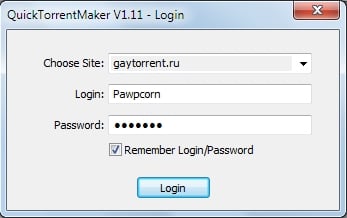
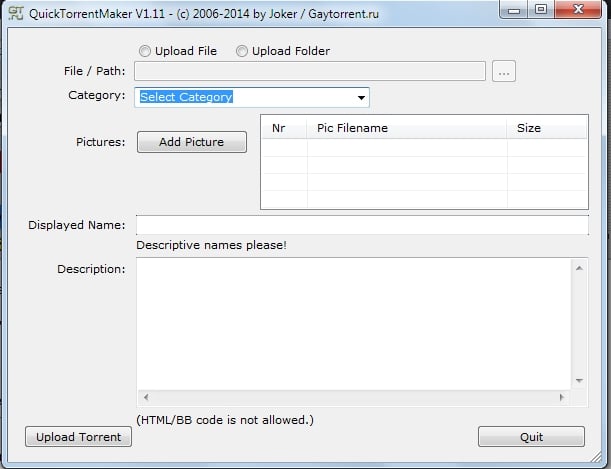
Note: DON'T include the quotation marks that you'll see in the uTorrent Properties window. These default settings above should work fine, assuming your Windows and uTorrent program is configured in standardized fashion. Make changes only if necessary, then click the "Install" button You SHOULD get this pop up window:  Click the OK button. To finish the installation, you need to start the program the first time, and save your user name and password, so subsequent QTM starts are simple one button clicks. Click on your Windows Start icon, go to the programs group (click All Programs) and scroll to the QuickTorrentMaker folder. Click on the folder icon to expand it, then click on the "QuickTorrentMaker" selection. On Windows 10, click on the Windows Logo icon (or press the Windows key) and at the top, under "Recently Added" is the GTRU QuickTorrentMaker icon. RIGHT CLICK on this button and choose: "Pin to Start". RIGHT CLICK on the button again, choose "More" and click on "Pin to taskbar". These actions should make QTM easier to find, for your next upload! NOW click on the GT.ru Icon button, to start QuickTorrentMaker. :cheesy2: THIS window should pop up:  Click the down arrowhead in the "Choose Site" and select "gaytor.rent" Click in the "Login" selection, and type in your member name. Click in the "Password" selection and carefully enter your password. Lastly, CHECK the " [[u]✓] Remember Login/Password" checkbox, so you never have to do this another time. NOW it should look like THIS:  Note that it MAY take as many as THREE attempts to log in to QTM, before QTM finally accepts you. :blink: Click the "Login" button… and SUCCESS!!! You SHOULD see this:  Now, you can refer to the QTM Tutorial [–click here--](https://www.gaytor.rent/qtm.php?tutorial) for further instructions on using QTM. Note that the next time you start QTM, ALL the site/member name/password information will already filled in for you. You'll only need to click the "Login" button. –----------------------------Additional Notes---------------------------------------------------------- NOTE that in QTM, when you click on Category, there's supposed to be a dropdown list of categories. If it's blank, exit the program, then go to your antivirus (etc.) software, and include the "QuickTorrentMaker.exe" program in the list of ignored programs. I did that, and got the category dropdown list to show again. –------------------------------------------------------------------------------------------------------- Some members have written the helpdesk, reporting: > when I try to upload a file using QTM I keep getting an error that says "Unable to load qtm.torrent: torrent is not valid bencoding!" ~or~ > "I tried to create new torrent by QuickTorrent Maker v.1.14, but unsuccessfully. > Torrent file says "torrent has no hash parts". To fix this issue, you need to take the special characters out of ALL of the file-names, by RENAMING the FILES. ALL file-name characters must be normal ASCII characters, WESTERN ENGLISH FONT. This error occurs when there is an unsupported character in one or more of the filenames in the torrent's contents. Generally, the most common character is the apostrophe. Please ensure that there are only regular letters or numbers, dots, spaces, or dashes in the filenames of all of the files in the torrent. Once that is done, try creating the .torrent file again and uploading the torrent again. The new upload should work once these characters are removed. –------------------------------------------------------------------------------------------------------- NOTE: You may have to try as many as 3 times for QTM to accept your login… Also, your password is case-dependent; make sure your shift lock is not on… You can test your memory of your password by logging off the main site, then logging back in, but this time, typing in your password manually. If you need to recover your password from outside the site (IE logged off and can't remember your password), you can go to this link: [https://www.gaytor.rent/lostpassword.php](https://www.gaytor.rent/lostpassword.php) … if all else fails, and you can't seem to log back into the site, you can always send an email to: [email protected] –------------------------------------------------------------------------------------------------------- **NEVER click the minimize button on QTM, or you will lose the "Upload" button.** You can click on Windows XP "Show Desktop" icon, (or in Vista or Windows 7 or 10, bottom right rectangle of the task bar) to minimize ALL icons, if you need to minimize QTM. If you accidentally DO forget and minimize QTM, thus losing the "Upload" button, here's the trick to land on the hidden "Upload" button, when you're ready to upload: 1) Click the mouse one time inside the "Displayed Name" field, then 2) Hit the TAB key three times, then 3) Hit enter. –------------------------------------------------------------------------------------------------------- In addition, I'd like to add that QTM has occasionally been reported to have issues when working with large collections; it can have some problems making a correct .torrent file. So, you should probably use the web-based manual upload method, if you run into problems using QTM for uploading your collection. > If you click on the word "Upload" on the blue bar, you will be taken to the Upload area… > > There is an excellent illustrated upload guide there: [https://www.gaytor.rent/uploadguide.php](https://www.gaytor.rent/uploadguide.php) > > I would suggest you study that guide first, before attempting the Web-Based upload procedure, here: > [https://www.gaytor.rent/doupload.php](https://www.gaytor.rent/doupload.php) > > Note that the 4 things members seem to goof up the most when uploading their own torrent is… > 1) insuring that the video you want to upload is located in the same folder you normally DOWNLOAD your porn to, on your hard drive, and you should create your torrent file referencing THIS file, in THIS location!!! > > 2) remembering to enter the tracker URL as: [http://tracker.gaytor.rent:2710/announce](http://tracker.gaytor.rent:2710/announce) > when you create the torrent file, and > > 3) remembering to re-download your (modified) torrent file, AFTER you upload it. You must re-download the tiny .torrent file from your uploaded torrent presentation, in order to be able to seed it. > > 4) Remember that with THIS picture loader… the FIRST picture uploaded is the LAST picture displayed, in your torrent presentation. > > ...this all gets explained pretty well, in that illustrated guide I mentioned above. > > Don't forget to re-download your torrent, after you finish the above steps! –------------------------------------------------------------------------------------------------------- If, upon selecting the file name of the video file you happen to see a ? (question mark) appear in the file name… STOP. THEN, using Windows Explorer, while using the English-Language-Keyboard, go back to the folder with the video file, and RENAME the file. (Right-click the file name and select "Rename"). Non-Standard characters in the file name will cause unpredictable results and certain failure, when uploading. Identifying NON-Standard File name characters can be a bit tricky, because there are SOME NON-Standard characters that LOOK and APPEAR standard, but in fact are from a Foreign Language font, and not supported by QTM. AFTER you finish the renaming of the video file (using the English-Language-Keyboard to rename the file) then go BACK to QTM and select the renamed file. NO ? question marks should appear in the file name, before continuing. Thanks to member LEVI for pointing this issue out! :D –------------------------------------------------------------------------------------------------------- Final notes regarding using QTM, learned from my own personal experience (and problems) while using it... Before you start uploading your torrent with QTM, I'd advise you to STOP all your torrents in uTorrent, yet keep uTorrent running. This will insure a successful (automatic) re-download of the torrent, without uTorrent being too bogged down with it's own data processing, nor there being an overload of Internet traffic occurring, during your torrent upload, via QTM... In addition, there should be a "hands off the keyboard / NO Internet browsing" policy in place while QTM is performing its uploading, since this is a very data-intensive process between your computer and our website. This will minimize the chance of data loss during the uploading of picture and torrent data, over the Internet. I also shut down secondary Laptops and Mobile connections, during this process, too. --------------------------------------------------------------------------------------------------------- Compatibility issues with uTorrent 3.4.2 build 38656 (or current beta versions) is an issue of these versions of uTorrent being incompatible with many earlier standardized Torrent creation programs, and legacy folder structures and is addressed in greater detail here: [https://community.gaytor.rent/index.php?topic=22654.0](https://community.gaytor.rent/index.php?topic=22654.0) [{click here}](https://community.gaytor.rent/index.php?topic=22654.0) If you have any questions, comments and/or additional notes you feel should be added to this list, please add a reply to this topic. :cool2: Take care, Pawpcorn :love: updated March 7, 2018 to lead off with the instructions to make sure uTorrent is installed, and the link to do so, if needed. updated Feb 11, 2018 to remove all the dialog about login problems with Windows 10, 64bit, as version 1.14 seems to have fixed that issue. ALSO updated version numbers to show 1.14, as the latest version. ALSO added an explanation for stopping ALL torrents (to minimize Internet traffic) to help insure a successful torrent presentation Upload, via QTM. updated Oct.30, 2017 to include directions about the different locations for the program files of uTorrent, depending on whether it's 32 Bit or 64 Bit Windows… updated Oct.22, 2017 to add some Windows 10 specific advice regarding pinning the QTM program button to the Start Menu AND the Task Bar, AND moved this update notice to the BOTTOM of this post, where it probably belonged in the first place, lol :cheesy2:Hi…I'm having a problem with QTM in the last couple of days. I've been uploading a lot of torrents with no problem, but now when it should be "checking" the torrent prior to seeding, it is automatically going to "searching for peers", as if I'm downloading the torrent. It's also saying I have 0 out of however many pieces. I'm using the latest uTorrent. This only started 2 - 3 days ago. It's almost as if QTM does everything except actually create the torrent itself. I've looked online and cannot find any solutions. Also sent a message to the help desk, but have not heard back yet. Any help would be most appreciated. BTW..I've done no updates with my computer or programs. This just started by itself.
-
After the latest major update of Windows 10, QTM does not seem to work properly any longer.
Sorry for that. This will take some time for investigation and fixing.
be patient
-
Hey guys,
My issue with QTM is after creating the torrent file and uploading (or it downloading it) inside uTorrent. It reaches 99.8% "connecting to peers" and then it stops.
Any idea why this might be?

-
Hi, I hv a problem where there is no drop list in select category. Cant upload because of this
-
follwed all advice listed here.. msged help desk again after being told to read this (which i already had)
drop category still doesnt work
-
…just to put a wrap {a happy ending?} on the above dialog, since the OP chose not to... :blind:
===========================================================================
–------ Pawpcorn wrote: --------
==[ Helpdesk ]==dpb23 wrote:
windows 10 x64never had any issues until now
any sugesstions? tried reinstall.. didnt work
no options for category and it rejects typing it
thanks for any advice
Did you try the ideas for this exact problem included here: ? ? ?
https://community.gaytor.rent/index.php?topic=26015.0===========================================================================
–------ dpb23 wrote: --------
yes I do read the help forum before contacting gt.ru staffpeople still having issues
i havent changed a thing on my comp
===========================================================================
-------- Pawpcorn wrote: --------
https://community.gaytor.rent/index.php?topic=26015.0you read, but did you DO all of the suggested items?
You're currently the only member reporting this issue

===========================================================================
From dpb23 at 2019-12-01 06:35:15 (3 hours ago) GMTits working now
i read and follwed the forum advice a few days ago and it wasnt working so maybe it was my computer doing something i wasnt aware of during an update but i have update disabled.
ive donated here and to other sites...i think i follow the novel of rules. im constantly reading to use ru
no one wants to ask a random stranger for porn DL advice.at least i dont lol
assuming its not fun answering questions when you work in IT and have more knowledge that most using this site..
either way we are the ones storing & sharing everything so would be cool if it was a bit more user friendly.
ive never contacted admin in my life for any other torrent site but this one has a lot of content that others dont.
anyway sorry to bother you
:cheers:
-
i have disabled my anti virus
still the drop down for category is not displaying anything
this is a new error i have never had it before or had a issue
-
Is there any way to change the torrent client? I uninstalled uTorrent and changed to qBittorrent and now QuickTorrentMaker 1.14 doesn't add the created torrent to qBittorrent
-
@bear1989 Use this if you're not going to use uTorrent.
-
@bear1989 QTM isn't updated in years, unfortunately there's no way to use a different client as of now. If at least they'd put it on github so that someone else could maintain it...
Someone here in the forum made a new upload tool that is somewhat compatible with qbittorrent but it's way too unreliable so I don't recommend.
-
System referenced this topic on
-
-
@EugeneGabija-0 are your torrents visible on the site? give me an example of what you have posted
If your posts are on the site, but just not being downloaded, that is another issue
-
@lololulu19 no they werent.Status was ''dead'' thats the point.
-
@EugeneGabija-0 ... are those dead torrent already been posted here ...
or dead cuz' you are downloading the file you created ...When posting a torrent download the small torrent here not the torrent created by your client [it will not work] ...
Now once the torrent is done, dl here to add in your client, point it @ the correct file folder/external drives location...
For single file point location to the folder name,
For multiple files point in sub-folder origin not the folder w/ files ...SEE : https://www.gaytor.rent/faq.php#29 / https://www.gaytor.rent/faq.php#505
-
Trying to upload right now, and it literally will not allow me to select a category. When I click the arrow to get the drop down list, nothing comes up. So I can't do an upload at all because of this. Never encountered this before in the years of using the program. And I have only a day to get my ratio right!




Hello! It looks like you're interested in this conversation, but you don't have an account yet.
Getting fed up of having to scroll through the same posts each visit? When you register for an account, you'll always come back to exactly where you were before, and choose to be notified of new replies (either via email, or push notification). You'll also be able to save bookmarks and upvote posts to show your appreciation to other community members.
With your input, this post could be even better 💗
Register Login