How do you organize your files and allow torrent softwares to upload them?
-
I find it easier to change the folder to save to before starting to download. You don't need to use a single default folder.
So then are you saying, for example, that if you download 5 different videos from 5 different studios, and change the download folder location 5 different times for each video you download so that they go into various different subfolders, that the torrent program will know to upload/seed from those 5 different locations simultaneously because it remembers each subfolder you downloaded to? If so, I did not realize that was even possible and have just learned something new.
Otherwise, what seems easier to me is to just keep the same ONE download folder, then move the file to whatever subfolder you want once you're done downloading & seeding it to your desired ratio. This way there's no need to tinker around with the torrent program settings before downloading each video (or other file) you want to snatch.
-
I am saying exactly that - but obviously not if the movies are all in one torrent. You can, theoretically, have infinite different download locations (actually 'infinite' might be OTT) all going at the same time.
I don't know how exactly your torrent client is set up but when I open a torrent file in uTorrent it asks me where I want to download to. I just change the location to, say, my Falcon folder or my Catalina folder.It can be any location on my computer, any hard drive, partition, folder, sub-folder.
uTorrent offers a handy drop-down list of the most recently used folders or a Find button to look for the folder you want to save to.
If you download to one folder and then decide to move the file, uTorrent lists it as missing. You then just go to Advanced and change the location by pointing uTorrent to the new location and it will happily carry on seeding.

Forgot your second point. If you download to a specific folder, there is no need to move it (unless you change your filing system) so the file is just sitting there if you need to help with a seed.
-
-
Right-click over a torrent in the torrent app and you can change it's location - utorrent (and others does it for you and remembers that new location).
One can also get to see those different locations on disks to the main view next to ratio/completed/etc.
Utorrent is actually pretty efficient file handler compared to other apps, when one moves more than few files or large number of files other apps stop download/upload activities because the I/O is at max, but not utorrent - it keeps all activities going
-
I have the folders of the studios that I use to download already created:
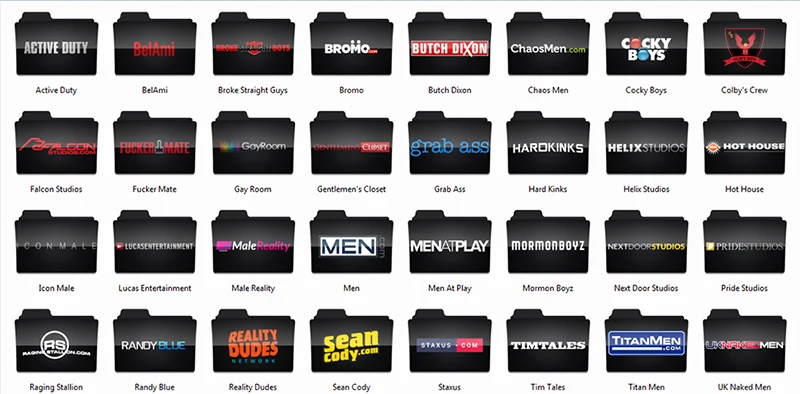
When I finish a download, I rename the file following the pattern "Scene Name - Actors" and move them to the corresponding studio folder, it looks like this:

After moving the file, I go back to Utorrent and relocate the file to continue seeding. The procedure to do this is in this tutorial: https://community.gaytor.rent/index.php?topic=19098.msg87887#msg87887
Hope this can help you
-
One can do the whole renaming in utorrent:
Pause the torrent
See content tab of the torrent
right-click and rename
(it's usually good to rename the "filename" in utors main view as well (copy paste)
Resume the torrent and Utor will rename the file to which name was given to it in the content tab.
right click the torrent and choose a location for it. -
hey Arma Rayo!!!
can i know how to make the older like yours.. your collection looks nice and organized.. with the studio name as the folder logo its easier to navigate.. teach me how to to my olders like yours!!
-
I'm not sure if that's Windows.. But one can select folder picture from folder properties.
-
Just after I download videos and then they all have _ or - or whatever I don't like, I use Magic File Renamer so I can change all those symbols I don't want in all files at once or I can delete first or last letters or numbers, or I can add studio name at the front of all files at once or change letter case.
If I want to make a list of all files I have, I use CopyFilenames that goes directly to filemanager in your PC so you do Ctrl+A, right mouse click and choose copy filenames and paste them to word document or paste them to decsription when you want to upload collection of files. It's very handy :cool2:
Then I usually put date first (year, month, day), title of video, actors. Sometimes specially if I upload videos as well, I put studio name as well.
For mormonboyz where each Elder has their own story, I put elder's name, number of chapter, other Elder's names if there are more and then title.
But if you do whole siterips like I do with few of studios, it gets pretty crazy -
hey Arma Rayo!!!
can i know how to make the older like yours.. your collection looks nice and organized.. with the studio name as the folder logo its easier to navigate.. teach me how to to my olders like yours!!
It's easy to make custom folders, but it's tedious. You need to have a basic knowledge in Photoshop to do. Try to do this:
- Enter the studios' websites, right click on the logo to open the image in a new tab and save the logo images of the studios you have.
- Follow this tutorial: https://m.youtube.com/watch?v=QJXzh8V8Cfc and save the image as .png after you edit
- Go to some website that converts .png to .ico and save the .ico files to a folder that you will never move from place to place. I usually create an "Icons" folder in the "Windows" folder and put the icons there.
- After saving the .ico in the folder for them, you go in the folder of the studios, properties, customize and choose the icon that you just made.
And it's ready!
I have these icons to share and I can do some other you want, send me a message with the name of the studios that you want the folder that I upload the .png and I send you. Then you just convert it to .ico, save it to the folder that you can not move and finally change the folders icon.



Hello! It looks like you're interested in this conversation, but you don't have an account yet.
Getting fed up of having to scroll through the same posts each visit? When you register for an account, you'll always come back to exactly where you were before, and choose to be notified of new replies (either via email, or push notification). You'll also be able to save bookmarks and upvote posts to show your appreciation to other community members.
With your input, this post could be even better 💗
Register Login