What is the best anti virus?
-
No antivirus is the best ! no antivirus is perfect!
If you have a strong PC i think you should try Karspersky
If you have a weak one try something like avast,avira,avg…For me vote for NORTON :3
-
I think Bitdefender is the best now.
I hold to ESET tho, Iv'e been using it for many years and it's so lightweight and never let anything happen. :police:
-
Kespersky is better if u have knowledge on some about Computer/IT/Related, It don't Tolerant anything Bad.
-
BitDefender and Kaspersky are the 2 best AV programs and have been for several years.
Every 2 or 3 years they switch who's the "best", but their test scores are nearly identical. Out of 100 points, Kaspersky lost out by 0.5 points for their 2014 versions.
-
I would never use either one of those. I either use clamwin or security essentials, though I'd trust clamwin more than Microsoft since it is open source.
-
According to the ClamWin site, it doesn't have real time scanning. That means you have to manually scan everything.
-
I don't like realtime scanning. Slows down a computer quite a lot and shortens battery life. I'm careful where I go and do a daily scan at 3 in the morning with clamwin (which does automatic scanning and update).
I used to like avast, haven't used it in a while. Hitman pro is also a great malware fighter and is cloud based so doesn't use any computer resources. -
Good modern AV software shouldn't be too much of a drain on laptops.
Also if you don't have an old computer, they shouldn't be too power hungry. Modern AV software uses a small fraction of computer resources compared to 10 years ago. 10 years ago, they could easily use up to 50+% of your computer resources. Now they use between 10 and 15%, except when doing full scans.
-
Good modern AV software shouldn't be too much of a drain on laptops.
Also if you don't have an old computer, they shouldn't be too power hungry. Modern AV software uses a small fraction of computer resources compared to 10 years ago. 10 years ago, they could easily use up to 50+% of your computer resources. Now they use between 10 and 15%, except when doing full scans.
I'm going to use security essentials as an example here.
Instal it on something, and copy a file on the same hard drive. A big one, mind you. Take a look at the speed.
Now, under settings, and realtime protection, turn file monitoring to only incoming files, behavior monitoring off, and network inspection off.
Now copy the same file. You'll see a huge speed increase - or at least I did.
That's just one of the things I saw different when I disabled realtime protection - or certain parts of it.
Also, on battery power, 15 percent is a huge deal to me. I'm on battery for a reason and hense want my computer to last as long as it can. -
At this moment, AVG is the best, fast compared to other (very fast compared to avast) , and more effective. Combined with periodic scans with malwarebytes antimalware, and adwcleaner.
Avira is a good alternative for old computers also, but it founds many false positives.
Obviously, I use linux, but I work repairing electronic stuff, computers, & cleaning the other people OS's >:D
-
I personally like the combo of Webroot (for a layer of password recall/protection) and Malwarebytes Anti-Malware (the free version is ok but subscription offers real time browse/search download protection) Both offer on demand system scans and/or regularly scheduled scanning
I also employ a VPN service. Overly protective :afraid2: or out right paranoia :fight:- you decide.
-
The 2 highest rated antivirus programs for Windows, according to consumerreports.org (2014) were:
Free: AVAST
http://www.avast.com/en-us/index
Not Free: ESET NOD32
-
I recommend finding out what works best for you based on protection, performance or ease of use based on AV-Test results. They're an independent company that test products regularly, and test the free versions against the paid versions too.
So, find a good AV: http://www.av-test.org/en/home/?avtest[type]=3
Plus Malwarebytes (because malware isn't viruses): http://www.malwarebytes.org/
Plus Hitman Pro Alert: http://www.surfright.nl/en/downloads/
And if you're super worried about network penetration, a firewall.Don't rely on having a Mac to protect you.
-
I don't use any, I use Linux and it's secure enough without antivirus

And beside security Fedora is great OS, I like it much more than Windows. -
The 2 highest rated antivirus programs for Windows, according to consumerreports.org (2014) were:
Their full ratings:
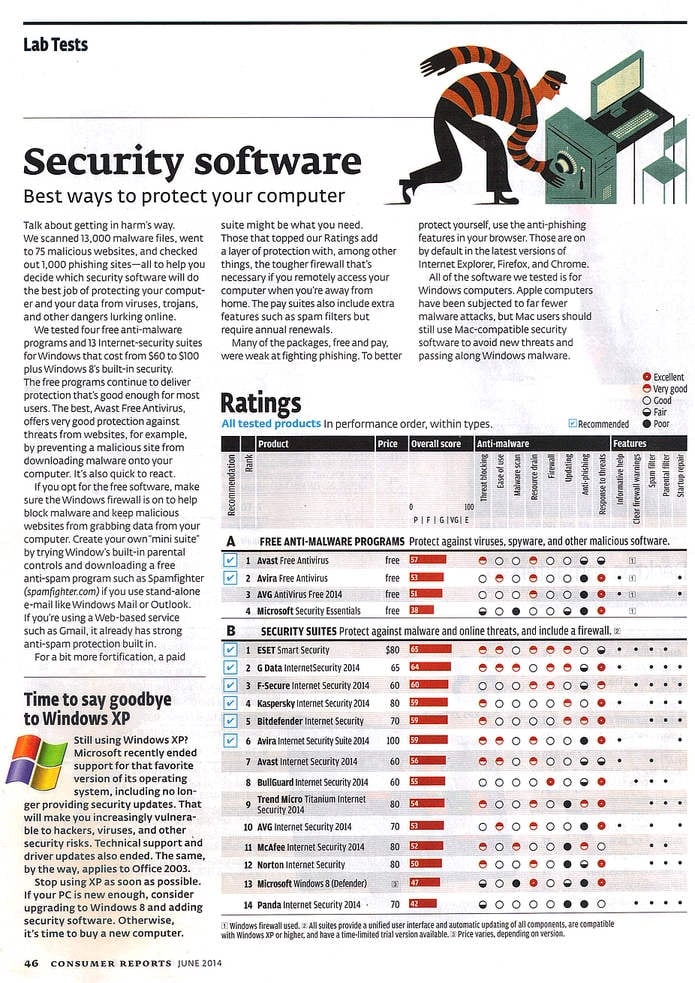
"Security Software, June 2014," Consumer Reports Volume 79, No. 6 (Yonkers, NY: Consumer's Union of U.S., 2014), 46.
-
The ones that tend to get the best ratings tend to be the Russian/Slavic paid ones - Kaspersky and the like. If you google it, Lifehacker does yearly rundowns with links to a bunch of the companies that help certify and test AV programs.
As for free ones:
-AVG and Avast both work /fairly/ well and are not too bloated, though some people have complaints about the free versions' EULAs.
-Security Essentials has gone horribly down-hill unfortunatelyNowadays antivirus is unfortunately only useful for uninspired attacks. When antivirus software first came out, viruses actually were viruses - they spread to files by amending or perverting them. The early viruses (and then worms, trojan horses and malware) were easy enough to deal with once they were analyzed; early anti-virus scanners simply contained lists of 'fingerprints' - telltale signs used by viruses to mark files that they'd infected, comments in the virus code and the like. If a file had a fingerprint, it was infected and the virus could be removed. Nowadays though, that's simply no longer the case in the vast majority of cases; malware is a multi-billion dollar industry and malware authors have been winning the arms race against antivirus scanners for quite some time. Things like polymorphism (code that mutates itself so it has no reliable fingerprint) and encrypted code (if the code can't be easily studied, a 'cure' can't be found easily) are commonplace and most malware authors sell kits that can generate customized malware on the fly to the specifications of the client. It sucks to say, but security these days requires a more proactive approach so my suggestion is:
-Use AVG, Avast or one of the paid solutions, but keep in mind that this is not 1989 and you are not 100% safe
-Disable Java in your browsers (not javascript) – it's rarely used and still a big buggy attack vector that is commonly on PCs
-Consider using a Firewall, either the Windows built-in or a free solution like Comodo
-Keep a malware-centric application on hand; Malwarebytes Anti-Malware is generally recognized as the leading piece of software in terms of detection and healing, plus their forums (and the app!) are free so long as you don't need real-time scanning
-Keep regular, staggered backups, and don't leave your backup system connected to your computer. This will help protect you from ransomware.
-Remember to have antivirus for your smartphone, especially if you use Android!And this is probably controversial, but: if you are infected with something that is not trivial and which your antivirus or antimalware only detected after you noticed things going wrong or after it damaged things, format the OS drive and re-install; unfortunately a lot of the new stuff digs itself in so deeply that you may never get all its pieces out.
-
Common sense is the best and most effective antivirus
-
A lot of my friends tried to discourage me from using Essentials, but I've been using it for almost 4 years now and so far it hasn't failed me. That and the fact that I'm very vigilant when downloading stuff from the internet. So, I guess common sense also plays a part. ;D
-
The best AV is: "first think, then click"
-
Common sense is the best and most effective antivirus
Yeah, not clicking "TOTALLYNOTAVIRUS.SCR.EXE" or "HOT COED WOMEN WANT TO FUCK YOU NOW, DOWNLOAD OUR APP" type ads/emails/etc will protect you 99% of the time, but it's still important to have an antivirus and antimalware solution for that 1% of times where you cannot have knowledge of the threat - the last virus I got was a 0day exploit dropper that I couldn't have possibly seen coming because it had only been released into the wild hours earlier. Fortunately my antivirus /did/ catch the files it tried to download and my firewall and antimalware caught the dropper itself when it tried to talk to its command/control server.

 </center>






Hello! It looks like you're interested in this conversation, but you don't have an account yet.
Getting fed up of having to scroll through the same posts each visit? When you register for an account, you'll always come back to exactly where you were before, and choose to be notified of new replies (either via email, or push notification). You'll also be able to save bookmarks and upvote posts to show your appreciation to other community members.
With your input, this post could be even better 💗
Register Login